
Software for administrators, from administrators
by Volker Weber
Installing software on a Mac is very different from installing software on Windows. You get exactly one icon that you can place anywhere, typically into the /Applications folder. Since this icon isn't really one file but rather a directory that is declared as a "bundle" you need to wrap it up into a Mac file system which understands what a bundle is. You do this by creating a drive image (.dmg). When a user double clicks a .dmg file, it will automatically mount into the file system and open a window like this:
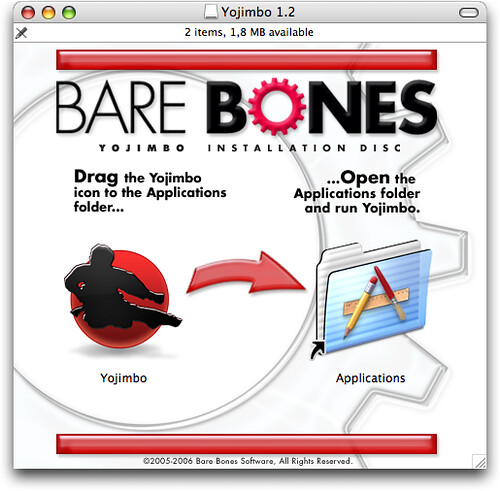
As you can see, the software vendor has placed two icons into the image. One is containing a bundle, the other one is a link to the /Applications directory. Then there is a background image with a logo and instructions. You drop the left icon on the right icon. You double click the right icon and load the application. Simple, isn't it?
It is too simple for IBM. There has to be a way to make this more complicated. And there is:
Launch the install program (st75_beta2_connectclient_mac.command) to extract the Sametime Connect application .dmg file to a directory of your choice.
Launch the .dmg file to create a virtual drive on the Desktop.
Open the virtual drive and drag the Sametime folder from there to your Applications folder.
Go to the new copy of the Sametime folder and launch the Sametime application.
So they built an "install program" which wraps the drive image into a script. If the user downloads that file via ftp however, this script will not be executable. And Mac OS X will not run it. Game over. Of course you can open a shell and issue these simple commands:
chmod +x st75_beta2_connectclient_mac.command
./st75_beta2_connectclient_mac.command
But (a) how many Mac users who are not administrators know this and (b) why bother in the first place? Drive images can be compressed, they can even display oodles of pages with legalese before opening and if that is not complicated enough, you can gzip them. Mac OS X knows how to uncompress a .dmg.gz.
Who dreams up this stuff at IBM?
Comments
Not to mention that you could just use PackageMaker which is freely available (from Apple) and would give you a nice installer for those rare programs on the Mac that actually need to be installed in different places of the files system.
Now where did you download this file from? I could do with Sametime 7.5 for the Mac!
Andy, you can't. This is a closed beta, it's not even listed on Lotus' beta page.
To judge the amount of Apple/OS X expertise at IBM Lotus, a simple look into a Notes Client folder tells it all. But otherwise that's no Mac only thing...
I wonder when we will see the Notes 7.0.2 Mac beta.
Thomas, it's not about Apple/OS X expertise at Lotus/IBM. It's about user integration and usability expertise.

