
Neither 8 nor 4294967274
by Volker Weber
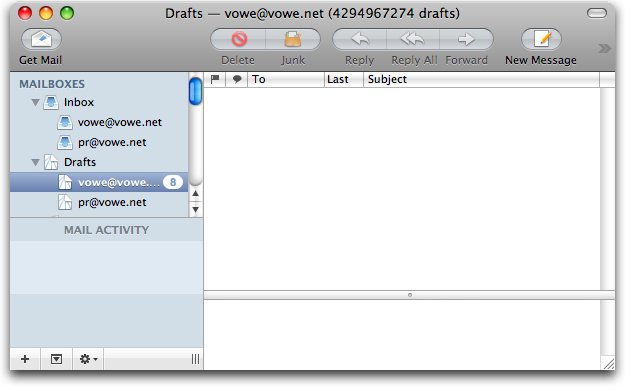
Raven is now running on Leopard, Lucy is still on Tiger until I have a patched image which lets me install on 800 MHz.
Update: Lucy is now also running Leopard. And quite well, I might add.
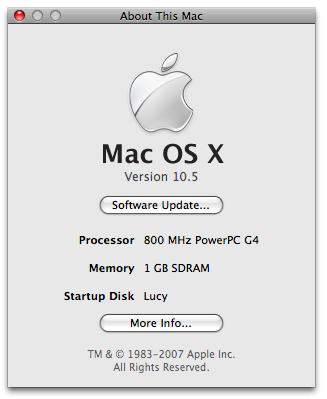
Update: There is a bug I still had to discover. Lucy does not sleep. If I put her to sleep, she never really wakes up again. The display remains black. There obviously is an unresolved bug in 10.5 which led to the 800something MHz minimum requirement that I worked around.
Comments
Du Glücklicher. Ich habe heute morgen das Update angeworfen und alles was mir der Leo statt den erwarteten Krallen bis jetzt zeigt, ist ein sanftmütiger blauer Bildschirm. Ein schnelles googeln zeigt mir auchgleich ich bin nicht allein. Scheint mir eine recht widerspenstige Wildkatze zu sein.
Mischa
Der Blauschirm hat sicher etwas mit APE zu tun. Auf Slashdot habe ich diese Lösung gelesen:
http://it.slashdot.org/it/07/10/27/1838248.shtml
(im Text):
Or, if you actually get the blue screen:
1. Reboot into single-user mode (hold Cmd-S while booting machine)
2. Follow the directions OSX gives you when you get to the prompt (I think these were them - just type the two commands it tells you to):
fsck -fy /
3. Remove the following files:
rm -rf /Library/Preference Panes/Application Enhancer.prefpane
rm -rf /Library/Frameworks/Application Enhancer.framework
rm -rf /System/Library/SystemConfiguration/Application Enhancer.bundle
rm -rf /Library/Preferences/com.unsanity.ape.plist
4. Exit, to continue booting normally
exit
Vielleicht hilft's
Danke Kim. Auf genau den Eintrag bin ich auch gestoßen. Leider war es nicht die Lösung. Auch nochmaliges installieren und entfernen aller angeschlossenen Geräte brachte nichts. Die Lösung brachte dann die Installation mit der Option "Archivieren und Installieren". Vielleicht sowieso der bessere Weg den Leo zu installieren.
Ich tippe als Fehlerquelle auf meine Logitech Funktastatur oder das externe Laufwerk von WesternDigital.
Naja nun ein paar Stunden später schnurrt das Kätzchen und ausser einer ein wenig längeren Startsequenz, habe ich bis jetzt nichts weiter zu bemängeln.
Mischa
Yes, Leopard works fine on the G4 however, I found nothing worth the upgrade so far.
The new icons rather dull, Spaces irritating instead of helpful, the new Finder interface in general not as intuitive as one would expect from Apple and, finally, Time Machine a bit of a nuisance.
In one day I haven't managed a full backup yet. Please give me CarbonCopyCloner.
Is it just me or is anybody else experiencing the same?
habe bis jetzt noch keinen validen Trick zum Update meiner über FW800 angeschlossenen externen SATA HD gefunden außer alle Daten zu löschen und eine neue partition mit Leo-Image zum Booten zu erstellen. Das ist ganz und gar nicht, was ich will.
Ich hätte gerne ein update des funktionierenden 10.4 auf 10.5 auf der externen Platte, aber mit allen Möglichkeiten (incl. CCC, Anschluß der Platte als USB-Device etc.) haben bislang nicht den gewünschten Effekt gebracht.
Nun CCCe ich die interne, aufgerüstete HD auf die "lebende" externe Platte, mal sehen, ob dabei irgendwas überlebt.
Letzte Variante wäre, das Laufwerk irgendwie an meinen G4 zu hängen, und es darüber zu probieren, den update zu fahren.
Hrrrmpf. Das war früher einfacher - für mich eines der wesentlichen Argumente gegen Windows und für OS X ist immer die Einfachheit der Herstellung bootfähiger devices und das Wiederherstellen von Backups gewesen.
Auch ich hatte das Blue-Screen-Phänomen auf einem iBook G4. Allerdings war dabei keine externe Hardware involviert. Meine Vermutung war der etwas knappe Plattenplatz.
Neuinstallation mit der option "clean" funktionierte dann.
Solange das Phänomen nicht (von Apple) sicher analysiert ist, kann ich nur jedem zu einem Fullbackup vor dem Update raten.
Is it just me or did .Mac fail to sync the contacts data after upgrading to 10.5 for anyone else?
Wie bekommt man denn Leopard auf ein 800 Mhz iBook?
Not an iBook, but an iMac in this case. Anyway, the trick is to modify the installation medium. There is a long explanation, and a short one:
Search the Internets for a patched OSInstall.mpkg (or create your own one, which is the long explanation). Put the file on your desktop.
Open Disk Utility and create a R/W image of your installation medium: Mac OS X Install DVD. Mount the image.
Open Terminal and cd to the appropriate folder: cd "/Volumes/Mac OS X Install DVD/System/Installation/Packages"
Rename the original file: mv OSInstall.mpkg OSInstall.mpkg.original
Move the new file to the medium: mv ~/Desktop/OSInstall.mpkg .
Burn the new image to either a dual layer DVD or ccc it to an external disk.
Install from there.

