
How to open links in Safari from Lotus Notes
by Volker Weber
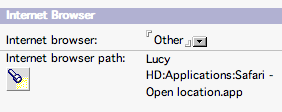
Lotus Notes lets you set your preferred web browser in your location document(s). On the Mac however that only works if your preferred web browser happens to be Internet Explorer. And that is currently the worst browser on the Mac. If you select "Other" and point to Safari, Notes will store that preference but you will no longer be able to open links by clicking on them.
Eric Garneau pointed me to an Applescript that solves this problem. Download the script, place it in your Applications folder, then edit your location document and select this script as your "Other" browser. Bingo!
Wouldn't it be nice if Apple and IBM could agree on how to pass a URL as an argument to Safari? Or Mozilla for that matter?
Comments
Finally! GREAT ... Thanks, Eric - and vowe!
Thanks, Volker.
I posted this information also here (AtNotes.de - the greatest Notes/Domino - Internet-Forum after LDD :-)
The apple script works great!!! I am just so glad that I don't have to use IE anymore!! Woohoo!
Broken link :o(
Bad Request (Invalid Hostname)
There is a beta of 6.5.3 for the Mac available on the IBM Trials & Betas site. I installed it and it now supports using Safari as the default web browser.
wow. Any idea where we can get the official 6.5.2 release for the moment?
awesome! works great, we were wondering how to do this.
i tried downloading the script from this page and then pointed the browser path in that script, but received msg, "unable to launch program" upon clicking a link in lotus notes. the script downloaded is a .sit and not a .app. does it have anything to do with the error? or i need a script loader file to automatically open safari when clicking links in lotus notes?
A .sit file is an archive much like a .zip file. You have to first unpack it.
i unpack it and extracted the .app file, performed the same procedure and still getting the "unable to launch program" error on the screen. appreciate more help. thanks. :)
Since you are not aware of the difference between an application and a Stuffit archive, I have to ask you this: are you working on a Mac?
Thanks so much! this was a huge pain
Any ideas for the iphone??? Its amazing there are no options for us

