
How to fix iTunes 4.7
by Volker Weber
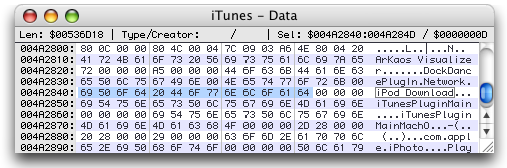
Apple updated iTunes last week to version 4.7 and while doing so "enhanced" it so it would no longer work with iPod Download. As it turns out it is rather easy to remove this enhancement. The code obviously checks for the name of this plugin. Change the string within iTunes with a HEX editor, and bingo, there is iPod Dowmnload again. Make sure you do not change the number of characters.
Comments
Just in case I need to ever recover my iTunes library from my iPod, here is a simple procedure that does not require any tools:
1: create a new folder. for simplicity we'll just put it on the desktop and name it newMusic.
2: open up the terminal (/Applications/Utilities/Terminal)
3: in Terminal type:
cd /Volumes [hit return]
ls [hit return]
3b: look for the name of your iPod, then select and copy the name
3c: in Terminal type:
cd [paste iPod name here]/iPodControl/Music [hit return]
pwd [hit enter, make sure that you're in the music folder before you proceed]
3d: Music might be music instead... this makes a difference.
4: in terminal type:
cp -R * ~/Desktop/newMusic [hit return]
5: This will take a while. You'll know it's done when you get a new line in the terminal.
6: drag the newMusic folder onto your itunes library. You'll notice that the contents of that folder are not organized in any logical way. Doing this iTunes bit will re-arrange them by artist/album/song so you can find everything.
7: OPTIONAL: before step 1, create a new user so you have a fresh iTunes to work with. Perform steps 1-6 as that user. When you're done with 6, quit iTunes and drag the new user's /User/newUser/Music/iTunes/iTunes Music folder to /Users/Shared. You now have a neatly organized music directory that your normal user can access so you can cherry pick what you drag into your own iTunes library.
Hmm. You don't happen to also have a patch that'll make iTunes 4.7 work with mt-daapd again?
Hello, I don't know if this is the right forum, but I have spent months trying to get iTunes to work. I have a G4 powerbook. For some reason after updating to 4.7, iPod stopped working and wiped itself. ITunes followed suit and will not open. I have constantly deleted and reinstalled iTunes (including receipt) and it still will not open when I click on the iTunes icon. I have never seen a post on all my travels that address this exact dilemma -- that iTunes refuses utterly to open. Strangely though, I notice if I try to delete iTunes after trying to open it, the computer will say that it is in use. So I still have to force-quit iTunes as if it was actually working in order to trash it. Does anyone at all know what may be the problem? This started back in April and I have not had use of either iTunes or iPod since. I have written to lots of people but so far no one has been able to help.
Thank you for reading this. If I am in a wrong forum for this kind of thing, I apologize.
John
I tried the procedure just in case you ever want to recover iTunes on my windows XP in the Comand Prompt and just typed in cd/Volumes and I hit the return and the system said it could not find the path? What am I doing wrong? Thanks Kathy Moriarty

