
Less is more
by Volker Weber
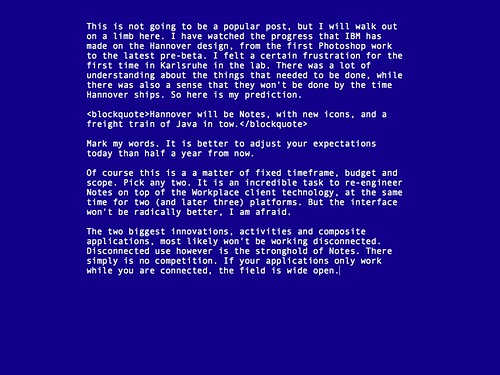
This is a perfect tool for me. Focus on writing. No distractions, no formatting, no windows, no icons. Just text.
For Mac users who enjoy the simplicity of a typewriter, but live in the digital world. WriteRoom is a full screen, distraction free, writing environment. Unlike standard word processors that focus on features, WriteRoom is just about you and your text. Requires Mac OS X 10.4 or later.
Comments
Nice. But why not just use a Terminal/Xterm window with vi or some other kind of plain text editor or Mac OS TextEdit? I like the fullscreen mode, though...
I just want to say the same as dennis. I use vim on Linux, Mac OS and Windows (yes, it works). You just had to learn a few things, but then you can write as long as you wish ;-)
So, it's kind of like Notepad without the menu at the top? ;)
This is interesting, about 17 years ago WordPerfect had a study done comparing the quaity of Thesis written on Macs (now would be considered WYSIWYG WPs) versus the one's written with a DOS WP like WordPerfect.
The study found that whilst the Thesis created on the Mac looked prettier, and had nice fonts etc. The content was not as rich. The conclusion they came to was that the Mac users spent more time focusing on layout and presentation then content.
I'll have to see if I can find the report anywhere.
Chris, much more radical. Notepad without anything. No windows, no menu, no titlebar. But customizable margins, color and font. This is my setup.
Reminds me of a Windows blue screen :-)
You can have it any color you like. But it does not crash. :-)
Just giving you a hard time. I think I like your setup rather than the other "green screen" image that reminds me of my dear old iSeries!! I think at one time I actually had changed my iSeries emulator to be blue and white like your setup...
Actually, Volker's setup looks like Word 5.0 / 5.5 on DOS (or OS/2). If anyone remembers either of those ;)
Without the silly do-nothing border. And I hope it is more like Word 4. The last version that never crashed and never destroyed a document. Or was it Word 3? Cannot remember when I saw my first Word crash.
Escape-Übertragen-Laden. :-)
Now, Word 5.5 never crashed any documents for me. I still have a working copy, even use it from time to time ;)
OK, I've tried Writeroom now, and I must say, it is better than I thought. You can really focus on your writing. That's nice. It is also nice, that you can create multiple writerooms without saving and it does not bug you with annoying "do you want to save unsaved changes" dialogs. That's really nice! On the other hand, I am really missing a scrollbar. How do I know in which position of the text I am?
How about the Freeware alternative JDarkRoom?
http://www.codealchemists.com/jdarkroom/

