
BlackBerry 8800: First Impressions
by Volker Weber
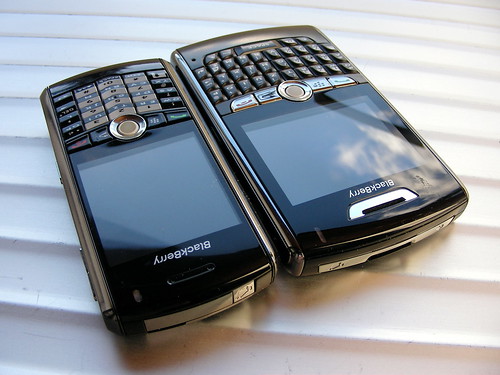
(Click the image for more photos)
Executive summary: Pearl with a decent keyboard. Minus camera. Plus GPS.
The 8800 looks and behaves like a Pearl. Same buttons, same trackball, same finish. But a much better keyboard. Ute has tested it and immediately said that it feels much better than the 7290 keyboard she is used to, which I find better than the 8700. This is a huge improvement over any BlackBerry handheld I have had so far.
Not exactly the same buttons: The 8800 has a dedicated on/off button at the top, a feature that has always been missing from BlackBerry. I was confused a bit at first, since this button is placed where the Pearl mute button is. I use this button quite often to put the Pearl into standby mode, which it only leaves when the button is pressed again (or if a call is received). This is a very convenient keyguard. The 8800 has the same mute/standby button, but it is located on the other side.
There isn't much else to say at the moment. I have put in a 1 gig microSD card, the SIM and the battery and everything worked as expected. I have registered the device on my BIS which also went fine this time. However, the network currently refuses the data connection. I suspect that the device is not accepted, since it is yet untested on the network. Since I only have an O2 SIM at hand, I cannot switch providers at the moment. Will test with Vodafone at the end of the week.
Biggest surprise for me: GPS is included. The Maps application is installed but was hidden by default. You just load it up, then start the GPS receiver from the menu. It is now looking for satellites which means, I have to step outside. Three minutes later: It. Just. Works. I like.
The 8800 is obviously wider than the Pearl, but it is also a bit taller. The Pearl is only slightly larger than the groove on the 8800 backside, which you can see in this photo.
Update: I have tested with Ute's Vodafone SIM and the data connection was not refused. So it is indeed the O2 network which refuses to serve the device. Well, she wants her SIM back, so I am back on the Pearl for now.
Comments
Is the 8800 just an interims version? Though RIM's product shots show a nice WiFi symbol and Vowe claims that GPS instead of UMTS/HSDPA is a good swap, I have the feeling that the initial 8800 is a somehow stripped down version. Even the missing camera (I know in the big business a camera is a no-no) seems to be an indicator for this.
So the big question is, does the lack of WiFi, UMTS/HSDP and a camera mean, we will see these upgrades in the near future (and I should wait to buy now)?
Thanks for the review. I'm curious to play with it as soon as I can get my hands on it. Onboard GPS is something I always wanted to have in a mobile device and I'm looking forward to see what the GPS navigation software manufacturers will come up with in the near future.
Off the topics:
Mein 8800 ist da, gibt es einen Anbieter von (kleinen!) Taschen im Internet?

