
How to use the Nokia E90 as a modem
by Volker Weber
Erkki called me today about my E90 modem setup because he could not get it to work. Since I don't like to do tech support on the phone (read the faq) I asked him to send an email. Instead of answering by mail I chose to explain here.
I use Ross Barkman's modem script for Nokia 3G phones. Download the archive, unstuffit, put the two script files into /Library/Modem Scripts.
The setup is very simple: Set Up Bluetooth Device from the Bluetooth menu item as follows. In the GPRS CID String field you put your ISP's access point name. For o2.de I can leave username and password empty:
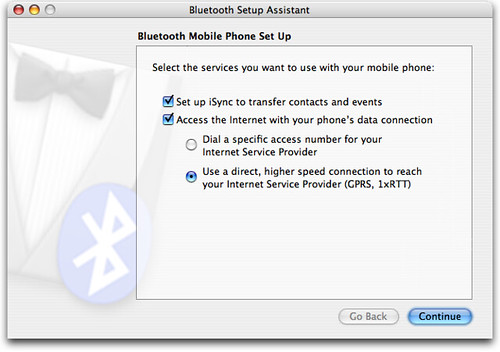
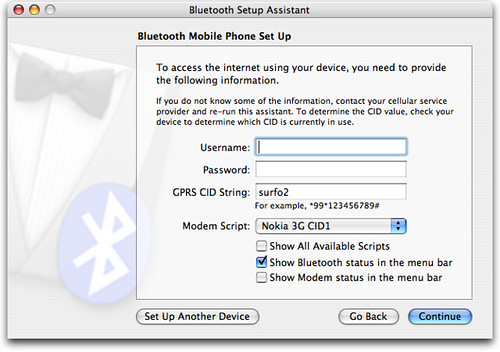
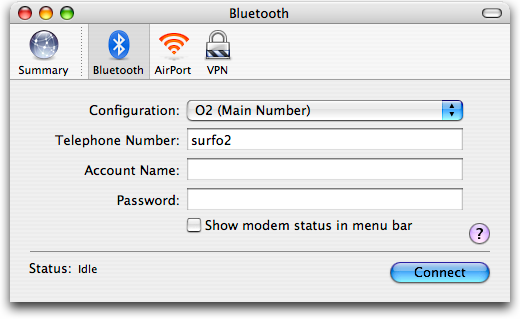
Then you open Internet Connect and hit Connect. The GPRS CID String shows up as Telephone Number. That's all.
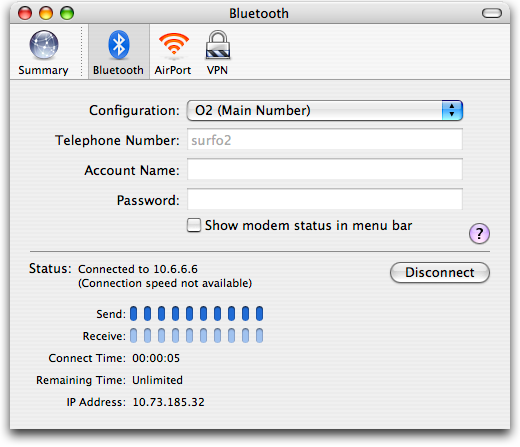
The Bluetooth connection is faster than UMTS, but not fast enough for HSDPA. If you find out how to connect via USB, let me know.
Comments
If you're looking for the procedure on Windows, it must be pretty similar to the one on the Nokia e61i : http://www.nokia.com.sg/nokia/0,8764,102177,00.html
A good point to say THANK YOU to Volker. More than once he saved me time and a lot more when putting these kind of howto's or tech. reviews online. Go on mate!
At least somebody said thank you. The original caller did not, as expected actually.
Its always like that. People ask for information but never come back
Um die neuen Datenpreise (Pakete) bei o2 nutzen zu können, sollte definitiv nicht der APN "internet", sondern "surfo2" verwendet werden. Kann sonst teuer werden (Standard MB Preis).
Danke für den Hinweis. Habe die Bilder entsprechend ausgetauscht.
With the modem scripts and information provided by Ross Barkmann's site I was able to get online with my new Nokia 6021 within five minutes after receiving my new SIM card from Simyo last week.
So - thank you Ross Barkmann for helping me to get my MacBook online hassle free.
And thank you, Volker, for now providing the pictured version for all the other lost souls out there. ;-)
Danke für die Anleitung. Ich hatte noch die alten Ross Barkman's scripte "Nokia GPRS..." ging zwar auch (3G) mit den neuen geht es aber schneller (3,5G). Noch etwas schneller geht es m.E. über USB laut SpeedMeter.de
"If you find out how to connect via USB, let me know.":
Die Lösung ist recht einfach bereits Ross Barkman's erwähnt, dass seine Scripte auch bei USB Modems funktionieren
1) USB Modus des E90 auf PC Suite stellen (sonst fragt das Teil dauernd nach & baut keine Verbindung auf)
2) USB Kabel einstecken zwischen Mac & E90
weiter gehts auf dem Mac
3) Systemeinstellungen / Netzwerk öffnen
4) Anzeige : Netzwerk-Konfigurationen wählen
"Nokia E90" erscheint unter Anschluss-Konfiguration
(Bitte keinesfalls den Namen ändern bringt nichts & geht nicht dauerhaft)
"Ein" auswählen und nach oben schieben, wenn es noch nicht der Fall sein sollte
5) Anzeigen Nokia E90 wählen und PPP, TCP/IP, Proxies, Modem wie bei der Bluetooth Modem Variante wählen.
6) Verbinden Button anklicken & freuen (ich hab erst geglaubt das es funktioniert nach dem ich Bluetooth auf E90 und Mac deaktiviert hatte.
Leider wird das E90 zumindest mit meinem Kabel am USB Port nicht gleichzeitig geladen, geht wohl nur mit einem weiteren USB Ladeadapter, der in den Ladeanschluß gesteckt wird.
Wer dafür eine Lösung hat oder die Variante mit 2 USB Kabeln getestet hat bitte posten. Oder gibt es schon ein Splitterkabel?
Danke! Bryan!
Dear Volker,
Thanks to your usefull tip, I found Ross' scripts. But when I unzip them, they are not recognised as scripts !?!? I tried everything, but can't get them showed in the ModemScript list ...
Did you encounter this problem earlier, or is it just a stupid mistake in my brain ?
Grtz,
Sammy ;o)
For contract O2 in the UK, you want all the same except:
tel number: mobile.o2.co.uk
username: o2wap
password: password
Hi, Just read your instructions and they are great. As you say so many people ask then never show any appreciation I thought I would say thanks it was very helpful.
Thanks Volker, works like a charm on my E90 with Tmobile in the Netherlands.
Your blog ROCKS :)!

