
New poll: how do you store your text documents?
by Volker Weber
Microsoft Word (97/2000) has been the most prevalent storage format here on vowe's magic flying circus. However, most of my text documents could be stored in any other format, including plain text. The trouble with plain text however is encoding: Windows and Mac use different encodings by default. This holds true for both line endings as well as character encodings.
So I am wondering how you store text documents. If your favorite format is not listed, please vote "other" and write a comment explaining your choice.
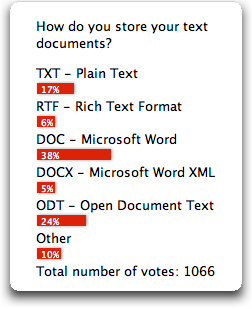
The results:
Comments
I chose DOC, because most of my documents are stored that way, but a significant minority (perhaps up to 30%) are plain TXT.
I tend to avoid storing documents in any format that might later on make it difficult for me to convert (not so long ago I had to access a Word3 document; PITA), which is why I prefer plain text, or derivatives thereof.
For a few years now I use Open Office and I am very satisfied with it. Almost every text document I create on my computer has the ODT format. Unfortunately I also have Microsoft Word installed on my system due to some format problems with clients. When working with bigger companys word is a must.
I don't store text locally anymore. Everything is stored on my web server's CMS. Therefore I should say that the format I use is XHTML.
I use a neat little app called "Notational Velocity" to create, store and manage those tiny pieces of information you collect, as well as need access to, on a daily basis. You can export and thus easily backup or migrate your notes to plain-text files.
Larger documents go via MS Word over here, as well.
I store documents in the default format of the word processor I'm using. This can be Word (mostly used at work), Pages, OpenOffice, LaTeX etc.
Important documents which have to be archived for several years are always exported as pdf; this obviously is the most portable format.
I don't deal with text documents much, but when I do it's always been Word until now. I reinstalled Windows on my PC recently and I didn't reinstall MS Office. I installed OpenOffice.org instead. I've opened Calc exactly twice in the past two weeks. I've never opened any of the other programs in OOo, but I have them ready in case something comes up. :-)
All incoming documents are scanned and stored as PDF, any important documents outbound are also stored in PDF. Almost all text documents I produce are stored in ODT, a few are produced in Pages and stored in Apple's proprietary format, which I don't really approve of, but unfortunately I quite like playing with Pages.
Typically native to the application I'm using, then PDF to customers as needed.
This should be an option on your list. "Native to the App that created them"
I still store a lot as Text / Rich Text in Notes databases.
Things that I want "in my face" for a while are in TXT files stored in my Desktop folder. Things that I want to save for a long time are documents in one of several Lotus Notes Document Library databases.
I use only plain text. The encoding problems Volker mentions are real. You can't attach a text file to an e-mail because umlauts or special characters like € might not be readable to the recipient. You can't paste the text into the e-mail either because clients may re-wrap the text, making it hard to read.
So I either write e-mails in my e-mail client from the start (and never save them anywhere else but on the IMAP server) or I convert a plain text file into PDF and attach it. All other documents are controlled by my IDE, and the encoding information is stored in the source control system. As long as all users honor the encoding information, there are no cross-platform encoding issues.
Mostly I use Lotus Notes databases. For smaller texts .txt files and for publications .doc files.
Mostly using Lotus Notes
I mostly produce documents (documentation) in Notes databases, so I store the content in that format. Makes it easy to backup, I just replicate the database to my workstation and home computer.
Another one chiming in who mostly uses Lotus Notes for storing documents. Word, Excel, PDF files... whathaveyou. :)
I use (La)TeX for almost all text documents. This format is as open as one can think of (you can read it with any ascii editor), so there's no lock-in syndrom. Also, used properly, LaTeX avoids any coding problem easily.
Rich Text Format notes in DEVONthink is the best solution for me
Since I bought my first PC in '96 I'm a user of OOo, formerly known as StarOffice, which was included with the first PC.
Today ODT is my format - and PDF for data exchange with others who don't use it.

