
Time Machine: How to backup to unsupported volumes
by Volker Weber
This is almost too easy:
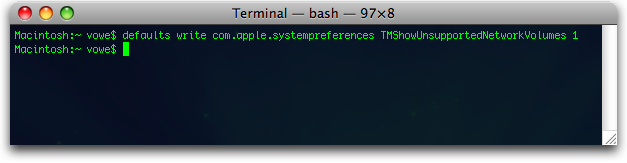
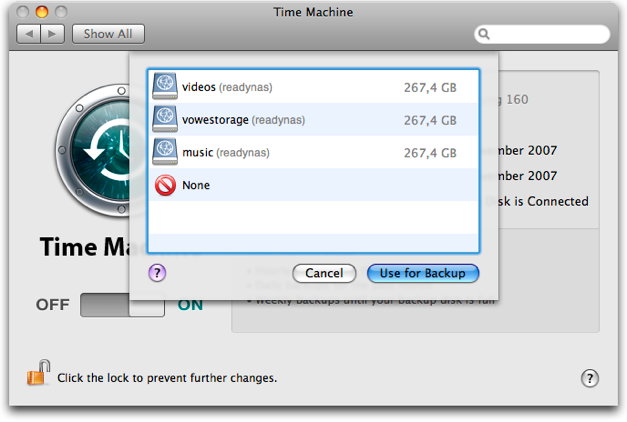
No, you don't have to type it from the screenshot:
defaults write com.apple.systempreferences TMShowUnsupportedNetworkVolumes 1
Comments
Looks like an interesting hack, thank you for that.
Just one question; is this supposed to work also on a WiFi network?
Well, as you know by now, it works great, even over WiFi-shared Tiger-based iMac... ;-)
This is real useful, thanks again.
An external drive hooked to an Airport Extreme seems like an ideal companion to a laptop with Time Machine.
Then again, writing to a drive hooked to the Airport Extreme corrupts my data. A large file has some bits flipped when it's written over wireless. Latest 10.4, latest firmware, I am not amused.
OT - that is a significant amount of music...
Please excuse my ignorance since I don't use Leopard yet, but I don't quite get the term "unsupported volume". IMHO it depends on the target volume's filesystem and its support in the kernel's OS wether it's supported/read/writable or not. Within this logic writing to an unsupported volume is impossible - or what criteria has Apple to call something supported?
Thank you, thank you and thank you again...!
;-)
---* Bill
@Phillipp: TMShowUnsupportedNetworkVolumes.
That's cool to know, but if TM is your only means of backing up then it's probably a bad idea to run it in such an unsupported way. There is usually a reason why stuff is disabled/hidden. At least, give it a good workout and then try to actually perform a full system restore. Backups are useless if the restore doesn't work. And you won't know until you try.
@Phillipp: Oops - missed that you know apple coined it. Sorry. Time for some coffee :)
Doesnt work as well as I expected. Seems that TM uses the ethernet mac address to name the sparseimage that it stores on the network volume. This breaks things if you want to sync stuff to airport disk from different network connections i.e. USB, wifi or ethernet.
My initial sync is 118G, i had hoped to do the first sync via USB then subsequent syncs via wifi. No dice.
Andy, Time Machine seems to use the MAC address of the primary interface for backing up to a network share but that doesn't break things as long as you use a real network connection to create the first backup. I just tested this using a time machine backup I created using the Gigabit interface, then disconnected the cable and tried to use the backup over a wireless connection. That went without problems.
The thing is that Time Machine will use a different on disk format if the target volume is a local disk and that's why you can't (easily) make the initial backup to a USB drive and then move the drive to a server and access the backed up data over the network.
The only way this *might* work is to fill the drive via USB/Firewird connection and then put it into a server that's capable of presenting the drive as an iSCSI target. You'd then need the iSCSI client driver to access the drive. As an iSCSI drive to Mac OS X looks like a local drive, this *should* work. Unfortunately I don't currently own a USB drive enclosure so I can't test this.
Yeah, I suppose you can do that. Assuming, of course, that you don't mind potentially losing some or all of your data.
See: More AirPort Extreme AirDisk Issues
Michael, a ReadyNAS is not an Airdisk.
Timo, thanks for trying to help me, but I still don't get it. Reading the answers I understand that I obviously failed to see that the filesystem doesn't really matter as we are solely talking about networked shares. However, this moves my failure to understand the term "unsupported" just to a different area since it's impossible to backup to a target protocol your own machine doesn't understand. And why would Apple mark shares as unsupported if the server is talking a protocoll OS X understands?
Might be a bit OT: But I am using a NFS to backup my data by TimeMachine w/o modifying the com.apple.systempreferences.plist - I just mount an image from there... :-)
Philipp, your problem is easily solved once you understand that there's a difference between Mac OS X and Time Machine. While the former is an operating system that not only knows about networked shares but also supports them, the latter, however, is just an application that *can* rely on the functions provided by the OS to talk to the network shares. But the sole fact that it is possible for Time Machine to use functions provided by the operating system doesn't mean that this functionality *has to be supported* by Time Machine.
It just boils down to this: Somewhere along the lines of development, Apple came up with some code that *would* allow Time Machine to use network shares as backup targets. But unfortunately Apple had to learn that this code could cause some major problems (most likely with AirDisks but maybe also because the on disk format *used by Time Machine* is completely different between backups on local disks and network drives) and thus they decided to disable the code (and mark it as unsupported) instead of completely removing it. And because they didn't remove it the more daring users are now able to *enable* it again (on their own risk) using the command stated above.
Specifically, [...] Apple disabled the ability to back up to a network share using Time Machine. "They made the right decision; it's not stable."
Apple Time Machine slammed (Techworld.com)
Stefan, thank you very much. Now I understand. =)
Hi Volker,
ich bin selbst am Überlegen ob ich mir ein "RND4425" zulegen soll.
Ein K.O.-Kriterium ist für mich die AFP-Unterstützung. Laut Datenblatt ist diese vorhanden, doch leider kann ich nirgens mehr darüber finden. Hast Du Probleme beim Zugriff via AFP,
oder kannst ggf. manchmal Dateien nicht löschen?
(Hast Du ggf. mal "Helios File System Test" laufen lassen?)
Darüberhinaus interessiert mich der iTunes-Server, was für ein "Server" steckt dahinter?
(firefly etc...?)
Danke für Deine Mühe,
Stefan
Gehört zwar eigentlich nicht hier her, aber: AFP hab' ich nicht getestet, da hier entweder NFS oder SMB/CIFS zum Einsatz kommt, der iTunes-Server ist FireFly, ja.
Slightly OT: what´s the impact of engadget mentioning this entry on the traffic profile?
The impact is not significant. About one percent of my traffic yesterday was coming in from Engadget. Today it is much less.
@Timo - This could be your problem - the method might produce backups which are corrupted if backing up by WLAN, according to Hardmac:
Indeed, when receiving data to be saved, the wireless station sends confirmation message to the computer. So, if writing data fails, Time machine will ignore it. Apple will need to work on the Airport 802.11n firmware before being able to activate this feature. The solution might be part of the future Mac OS X 10.5.1 update.
Vowe,
sorry for this pedestrian question, but i have a macbook (now running leopard) and a pc (running xp). I have even managed to put them in a network (i choose folders to be shared in each machine by the other)
I want to use time machine and my newly purchased iomega 500GB to back-up both the mac HD and at least the shred folder of the pc (ideally the whole HD of the PC).
I have done the regulat back-up with TM, but the shared folder of the PC appears in gray (and inaccessible) in that 'universe like back-up surfing screeen'
question 1: can i really do what i want? how?
question 2: can i do that but hooking the iomega to the PC instead of hooking it to the mac (since one is portale and the other is fixed)?
question 3: if the above does not work, can i partition the iomega and do a copy of the pc in one part and still use TM on the other?
PS - i tried the script above in terminal, and now can 'see' the PC's HD as a potential back-up place, but after that asked TM to 'back-up now' and the PC's HD is still gray in the "universe screen ...'
What is the answer to the last question? I have a tablet pc and an Intel iMAC. I want to use the iMAC as the primary computer, but I take the PC on the road to clients and have downloaded the client's data to the pc. I would like to save pc files on the iMAC and have TM backup the MAC and PC files. I also want to access the pc files (which are Word and Excel documents primarily) with the MAC.
Any suggestions?
How do you undo this hack, once it's been done?
defaults write com.apple.systempreferences TMShowUnsupportedNetworkVolumes 0
How would I backup to a certain folder on the unsupported volume? I'm connected to a server and I don't have privileges to backup to the main server but I have to choose a certain folder within the server (if that makes sense).
Any suggestions besides trying to contact MIS?
Thanks,
This worked fine for me until it filled-up the drive and the TM backups started failing. Seems TM can not delete the older information making room for new backups. Anyone have a suggestion?
Hi Guys,
great hack!
Here is my problem: I have a TeraStation attached to my local network with one big share and several folders. I would like to use it also with TM.
Now the question is: If I tell TM to use that share, there is no way of specifying a target folder. What will happen with the data that is already on the TeraStation? Is there a way of specifying a folder?
The total capacity of the TeraStation running in RAID5 is about 700GB. It would be stupid if I could not use it for anything else once I start using TM, wouldn't it?
ok, I found out how it works. As mentioned before, TM generates a folder named after the computer plus something that could be the MAC-Address and places it in the first folder it finds in the share. That's it. Nothing seems to be deleted. I will try out a few backups and restores and see how this behaves. I'll let you know if something comes up.
Cheers,
/Klaus
What if I want to back up to a 1G USB Key. There is just one 200MB folder I want to back up, but time machine wont let me back up to it. Its formatted OSX Extended and so on and i did the hack given above in termainal
Conor, why do you need Time Machine for a 200MB folder? Seems like overkill to me. Just drag n drop the files onto your USB stick (takes seconds), or just burn a CD.
I've been successfully running Time Machine onto my QNAP NAS box using this hack to enable an SMB share as a destination. I've had no problems since I set it up in January. I've written a blog entry about my setup and my experiences.
There's two issues that have come up in that time:
The disk space issue: you need to be careful when Time Machine fills the disk or you can lose all but one of your backups.
10.5.2 made it harder to set up new Time Machine backups. It's not as simple as turning on this default any more...
I've covered both of these issues, and ways to work round them in my follow-up entry today.
Cheers,
Adam
To undo this use
defaults delete com.apple.systempreferences TMShowUnsupportedNetworkVolumes
Good luck...
Hi,
Nice trick. But I couldn't figure out how to use it with my existing backups. Then found the how-to here:
http://rolf.haynberg.de/?p=83
Regards
does this means I can have a ext3 formated harddrive on my linux server, available trough a samba share to my Mac. And TimeMachine could backup to it this way?
This doesn't work for me (running OSX 10.5.6). I get this message...
Time Machine Error
The backup disk image could not be created.
Any ideas?
I get the same problem as well:
Time Machine Error
The backup disk image could not be created.
Same problem here. The backup disk image could not be created.
Not working. Any help?
I use storage connected via Firewire to a Mac mini as my Time Machine repository. That is actually a supported network volume. It works cleanly - I just wish I could a) adjust the syncing times of Time Machine, and b) have more control over some space usage, rollover of data, etc.
That said, I also rsync important things (like iPhoto and iTunes libraries) to online storage elsewhere.
I'm running OS 10.6.2 and trying to use Time Machine to backup to a folder on our office server. I used the code you provided in Terminal and TM can now see the volume from the server I want it to use. The problem now is I'm getting an error message that says, "Time Machine could not complete the backup. The backup disk is not available." I can drag and drop any file from my computer into the desired location and it works. TM can't seem to backup to the volume. Do you have any idea's as to why? Thanks for your help! Lance
After the last OS update, this does not appear to work anymore. The 2 machines I updated can no longer back up; the one machine I did not update continues to back up with no problems.
Same here after a while. I had to recreate the bundle image on the network drive, because Mac OS X was complaining about inconsistencies and gave me two options: #1 recreate now, #2 wait one day and ask again.
What an easy choice... Here is a knowledge base article about that issue.

