
Synchronizing iPhone with ... Lotus Notes
by Benjamin Stein
I can't remember nothing. I have to write down every appointment I make immediately. At my desk in the office I have Lotus Notes on Windows. Not my decision. It's just how it is. At home I have Mac OS X with iCal. On the way in between I have my phone.
But how do I manage to have those three calendars in sync?
Naturally the phone should be the proxy since it's the phone that I'm moving around and can easily plug in here or there. That's how I did it up to now. The phone was a Blackberry syncing nicely with Notes on Windows and iCal on Mac OS X.
But now I have surrendered – I have bought an iPhone. And everybody knows that it does not sync with Notes. So how could I buy it?! Honestly, I don't know. It's just such a damn nice gadget. I had to. But on the other hand I need the calendar information up to date on either end and in the phone.
With two software tools and some Web 2.0 I got it running. But the phone is not the proxy anymore. The proxy is iCal. Let's see how it works.
I started with an empty calendar in my Google-Account. Companion Link ($30) is a not so fancy but working tool that synchronizes unattended between Notes and my Google Calendar. That's nice. Whenever I accept an invitation within Notes it shows up in my Google Calendar automatically in a couple of minutes.
At home I emptied out my iCal calendar. Yes, I deleted everything, and I installed BusySync ($20). It's a Mac OS X service syncing Google Calendar with iCal. It's important to sync the calendar instead of just subscribing to it since you cannot edit subscribed calendars.
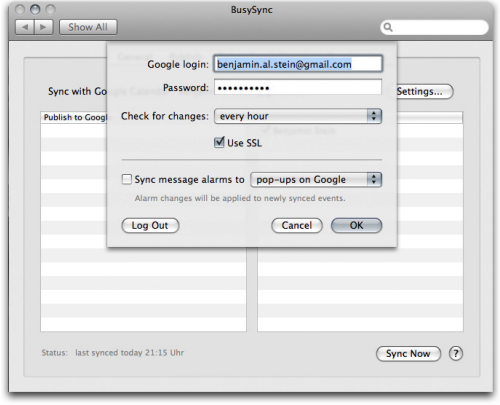
When I come home and switch on my Mac BusySync gets all the news from my Google Calendar. And when my iPhone gets connected to the Mac it synchronizes with iCal. Whatever I had added or edited on the road is synchronized to iCal, to my Google Calendar and from there to my Notes account (the PC is on all night...)
The Companion Link and BusySync work unattended. Whenever I edit my calendar on the Mac, in Notes on Windows or directly in my iPhone the changes travel around. For $50 extra. Looks like I can live with this setup. And you know what? I LOVE it not to have push mail anymore, but that's another story.
Comments
Great HowTo - thanks!
Is there a tool for syncing the Mac OS Notes ore can the iPhone even sync with Mac Notes' calendar? That'd be the best solution for me using Notes on the Mac as well.
I didn't look for a tool like that. But I doubt it.
This tool claims to sync Notes with the native Mac OS X applications. However, it does not seem to work well in a non-US configuration.
Very interesting, and a neat solution. However, it isn't the kind of thing a C[A-Z]O would want to set up, is it? :-)
Hi, very interesting.
I have nearly the same setup, with one exception: No iPhone yet, still waiting (for Notes Sync) ;-)
There are several unclear points for me though:
Does the "change travel around" only if the Mac at home and the PC in the office stay there and are running?
I guess so...
For example, I make changes on the road to the iPhone calendar and have also my PC laptop with me.
This, I would guess would mean that the Lotus Notes Version will get updated only the next time I have my PC laptop sync to Google calendar?
How error-prone is the sync?
When I used to sync my Palm at the office with Notes and at home with my Mac and iCal, I used to get lots of changes/rechanges/rerechanges, duplicates etc. between all the systems.
What is your experience so far?
Another drawback for me is that my company will not allow me to sync Notes to Google calendar...
Thanks for posting this solution
If the company does not allow syncing to Google Calendar this setup is not for you :-)
Regarding the stability: CompanionLink does not work safely in unattended mode. I noticed that I have to initiate the sync manually to be sure that the data is transferred.
I have no problems with duplicates. The only minor problem are holidays - inserted by Notes automatically into my calendar. They are synced to Google and the iPhone. Later on I have them twice in Notes but only once in Google and iCal and on the iPhone.
After one week of testing: It works but not like a charm.
Hey! Nice solution.
Now that the new Iphone is coming out, Apple has advertised a new service called "MobileMe" and it seems to do exactly what you need.
Have you looked at it?
Apple's MobileMe service
I did look at it. But I can't see how mobile.me should solve my problem. The Notes Server at the office is the very source of truth regarding my calendar. I did not read that mobile.me will synchronize with Notes. Did I miss something. If so, please let me know...
Yes. You are right. I guess we'll have to wait longer for Lotus-Iphone Sync.
Specially since MS Exchange is already IN the Iphone.
Anyway, I have the very same need, so I'll stay on the lookout and
keep you posted.
I just found this link for Lotus Notes - iCal sync - not tried it yet but about to.
lipsync link out..
Its called LipSync
Roy.
Given past (non) performance, I’d stay away from KissWorks. Are they still actually going? No sign of the website…
Hi Guys,
What i have done is I use an extra cell-phone to be the proxy.
The Sony Ericssson k800i (and probably other models as well) can sync with both Outlook and Lotus Notes. The iPhone is the best gadget i agree, so i use that for everyday use and the k800i as a backup, with a duo-sim.
Works great ! (plus the k800i takes petter pictures if you have the need for that)
kind regards,
Hi,
perfect - it works. This solution gives me finally the reason to buy an iPhone independent from a Lotus Notes sync tool for iPhone/Apple Calendar.
Thanks.
I've been using this same setup. Works better than any others I have tried.
I am only doing a 1 way sync from Notes to Google and from Google to iCal.
Using MobileME, I sync these to the iPhone along with my other calendars.
I do run into a few issues.
I need to leave Notes open on my PC, otherwise I get an intermittent file not found error in Companion link.
The Autosync option was very inconsistent. So, I've set up scheduled jobs on my PC to perform the sync every 30 minutes and another to "click" the ok button with a 15 minute lag to be safe. I couldn't find a way to to run the sync in an unattended mode.
Another problem that I see on an intermittent basis is the duplication of some of the calendar entries between Notes and Google, which then get propagated to the MAC and the phone. I have not found the trigger event that causes this to happen.
Any suggestions on what may be causing that to occur?
Frank
Moin,
my configuration is almost the same. MacBook with icCal (home cal), LN on the Mac (business) and an iPhone ("old" modell but 2.0 Software).
I used to use Entourage for my business eMails and Calender and there was no prob to have it synced with iCal and then to the iPhone.
Since LN and iCal are on the same MacBook, is there any way to sync those calenders dirctly on one computer?
I tried pocketMac Syncmanager; didn't work properly for contacts :-(
didn't work at all for all other components :-((
Support and Service was awful :-((((((
Roger
Very helpful post except b/c I'm in the same situation. Work uses lotus notes, I bought an Iphone. Problem is, I'm missing one piece of the puzzle, no iCal. I know Lotus Notes Version 8.02 will support iPhone sync using ultralite but our org is not there yet. Any advice or seen a work around when a mac is not involved?
Makes me want to take the plunge and buy a mac.
Just tried out nemussync for jail-broken ipods/iphones link. This will wirelessly sync Google calendar with the iphone calendar.
I'm only using Google/iPod for personal appointments and don't sync with my corporate Notes account, but it works well, and works for PC users (no iCal) and without the need to go through Outlook on the home PC
link
From the feature list of nemusync: Can sync Recurring Events (limited). No limitations please when it comes to my business meetings. But the very idea is promising.
I tried to get rid of the PC in my office and installed Lotus Notes on my MacBook Pro. Lotus on a Mac can export calendar files which you may import directly into iCal, but it doesn't accept recurrent events. So this procedure is quite annoying and does only work one way. So I only trust my LN on my Mac for the moment, "playing" just with my iPhone. Sad, isn't it?
I look forward to iClink, but I didn't try it yet.
Does anyone have a glimpse of experience with that stuff?
With the Lotus Notes Web Access infrastructure you an (t least) access you LN data from the iphone. That's not really what we want, or?
IBM is now shipping Lotus iNotes 'Ultralite' which should be an application on your iPhone to access your LN data. (see the following webpage)
http://www-01.ibm.com/software/lotus/products/domino-web-access/ultralite/
I tried for the last days to get in touch with an IBM representative ;-(
I'm still hoping for the best.
Pocketmac for iphone does not work.
Product support is non existent, no replies to mail or trouble tickets. I asked my money back. I hope that will work.
My configuration is MacBook Air - Leopard 10.5.6 - Lotus Notes 8.5 Beta 2 - iphone 3G
On the IBM Website I found an article "Developing a composite application in IBM Lotus Notes to integrate Lotus Notes and Google calenders." Here
Syncing (calendar & contacts) with google is what i'm looking for
However, i'm not a technical user and can't find how i can make this solution work for me.
Do you have any suggestions ?
Kind regards.
Sorry. I haven't tried PocketMac for iPhone. The challenge was to sync a Windows Notes installation with the iPhone.

