
BlackBerry 8707v: Notebook connected to Vodafone UMTS network
by Volker Weber
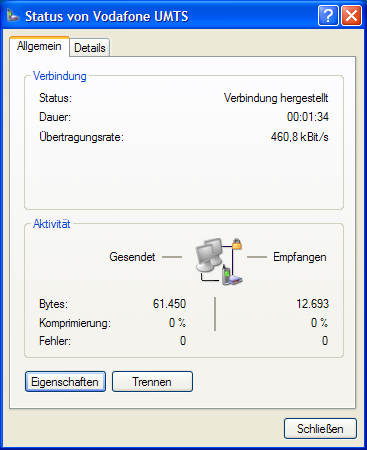
That was easier than I thought. Well, once I figured out how to set up the modem.
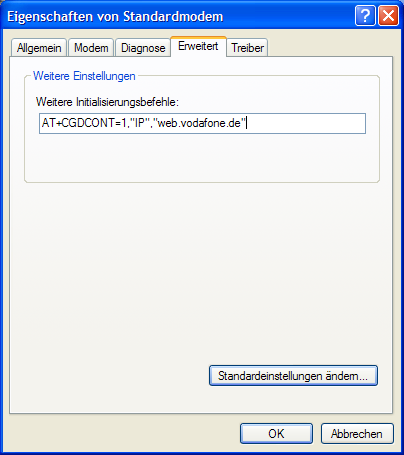
First you go into the Control Panel and set the modem init string on the fourth tab. Boy, I had not done that in years. This used to be a science. What is the perfect init string for a USRobotics HST? ;-) In this case you set your APN.
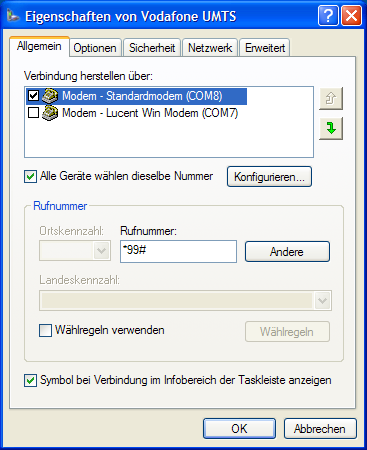
Then you create a new dialup entry, select your modem, and set the phone number to *99#. User and password are left blank.
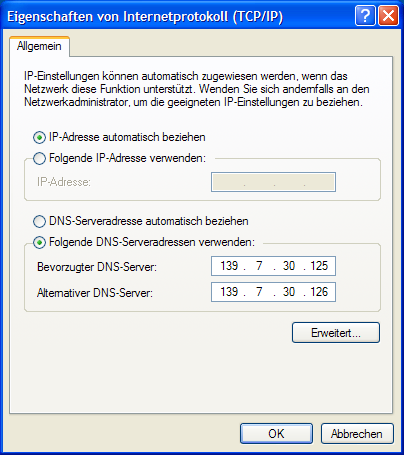
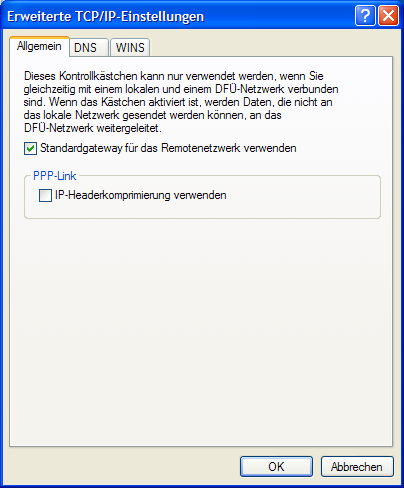
Go to the network tab and configure TCP/IP. Tell it to use the two Vodafone DNS servers. Hit the button underneath and turn off IP header compression:
That's all. Now you start your Desktop Manager, connect the Blackberry to your USB port and dial the new connection.
If your device is managed by a BES, make sure that IP-modem is not switched off. If you have a 8700 or a 7290, you can connect through GPRS in exactly the same way, you just get a much lower connection speed. Also beware, this is going to run up a substantial traffic bill. For Vodafone UK, your connection string should read "internet", instead of "web.vodafone.de".
Comments
Cool! Bonus points for doing it via Bluetooth? :)
Yup, go ahead. My StinkPad does not have Bluetooth.
Cool - and what about OSX? I have the same problem with my Vodafone UMTS PDA: VPA IV.
Easy to use with windows XP but no chance to use it with my macbook.
Any hints?
On the Mac I use the Nokia N70 to connect via UMTS. Marco has sent a bunch of Blackberrys to Novamedia who already support a a lot of devices. The early feedback however is not encouraging. Without the Blackberry desktop software, the device is not exposing a modem. It isn't over, but my bets are on "it does not work".
As for Windows Mobile, Microsoft wants you to stay in the family. :-) Missing Sync is a great companion, but I don't think it exposes the modem.
If anyone gets an hardware error 692 when trying to connect, do NOT copy & paste the init string from a web page or a pdf document. Type at least the quotation marks yourself!
"Smart" quotes? Chortle. ;-)

