Requirements for Apple software updates

Most of my customers who are issuing smartphones and tablets to their employees, usually give their users iPhones and iPads. As I have outlined in my previous post, a big challenge is to keep these devices up to date. I often get asked which requirements need to be met for the OS software updates to be done automatically or manually by the user. Until recently, there was not much public information from Apple on this topic for iOS and iPadOS devices. This support article was recently updated by Apple and now includes helpful details on the criteria that need to be met for the iOS updates to work, e.g. network requirements and power requirements. For a user-initiated update, the device needs to have a battery percentage of at least 20%. Rapid Security Response updates can be installed while the battery percentage is at 5% and the device is connected to power. If you are managing iPhones and iPads, I recommend you to read the support article. Previously most of the information was only available on Apple’s AppleSeed portal and covered under NDA.

iPhone Orientation Lock automatisch schalten

Über das Control Center kann man einfach umschalten, ob sich der iPhone-Bildschirm drehen soll, wenn man das Gerät dreht. Meine Normaleinstellung ist “sperren”, sodass das Display stets im Hochformat ist. Aber bei zwei Apps ändere ich das dauernd: Photos und YouTube. Dort betrachte ich meistens im Querformat.

Den Weg ins Control Center kann man sich sparen. Man legt dazu eine neue Automation in Shortcuts an, wählt App und dort dann die beiden Apps Photos und YouTube, lässt die Automation sowohl beim Öffnen als auch beim Schließen laufen und wählt als einzige Aktion “Toggle Orientation Lock.”

Nun wird automatisch die Sperre beim Öffnen der beiden Apps freigegeben und beim Schließen wieder eingeschaltet. (Ja, mein iPhone läuft in englischer Sprache, damit ich mich nicht mit den kruden Übersetzungen rumschlagen muss.)

USB-Sticks ans iPhone und iPad anschließen

Die App „Dateien“ auf dem iPad und iPhone hat ein praktisches Feature, das gerne übersehen wird: Man kann USB-Sticks anschließen und auf die dort liegenden Dateien direkt zugreifen. Ganz praktisch ist das auf iPhones und iPads mit USB-C-Port. Dort benötigt man keine weiteren Adapter. Es reicht ein Stick mit USB C-Stecker. Bei Geräten mit Lightning-Port benötigt man Apples Lightning auf USB 3 Kamera-Adapter. Je nach USB-Stick muss man bei dem Kamera-Adapter ein Netzteil einstecken. Das iPhone bzw. iPhone weisen darauf hin, falls das notwendig ist. Laut Apple werden folgende Dateisysteme auf den USB-Sticks unterstützt: “APFS, APFS (verschlüsselt), macOS Extendet (HFS+) exFAT (FAT64) oder FAT”. So lassen sich einfach auch größere Dateien von und zum iPhone oder iPad übertragen. Dies funktioniert auch mit externen SSDs bzw. Festplatten und SD-Karten. Verfügbar ist diese Funktion für Geräte ab iOS 13 und iPadOS 13.

iPhone Saddle Brown Leather Case

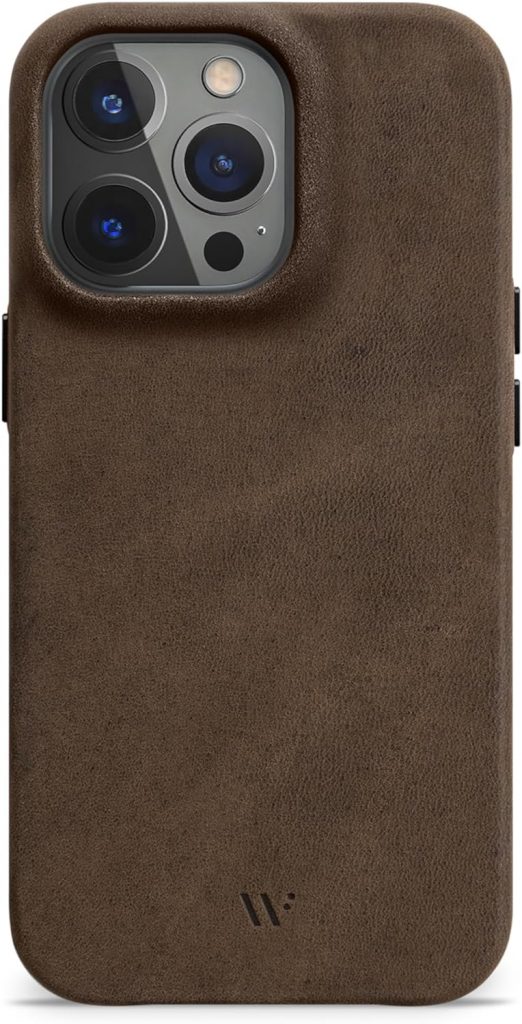
A few months ago, I told you about an Original Saddle Brown Leather case I was gifted and that I distressed to make it look vintage. Here is how it held up.

I brush the case every few weeks with a stiff brush without adding water or soap. After I work it with my hands for a bit it looks like the photo at the top. The case is very grippy and the phone never slipped from my hand, not even once.

This is my second iPhone 14 Pro which I got replaced in the spring of last year after I broke my first one while dropping it in a thin Aramid case. The case did not provide protection but it rather destroyed the back glass and the camera island since it delivered the whole blow of the drop to one corner of the camera island.

Either way, no iPhone 15 Pro last year. We will see what happens this fall.

Apple indigo hat BSI-Zulassung erhalten

Im Oktober 2022 hat das Bundesamt für Sicherheit in der Informationstechnik (BSI) die Sicherheitseigenschaften von Apple iOS und iPadOS bestätigt. Die Zertifizierung läuft unter dem Namen indigo (iOS native devices in government operation). Apple indigo ermöglicht die sichere und native Nutzung von iPhones und iPads im behördlichen Umfeld und ist für die Nutzung bis hin zur Klassifizierungsstufe “Verschlusssache – nur für den dienstlichen Gebrauch” (VS-NfD) zugelassen. Knapp 20 Monate nach der Pressemeldung des BSI hat Apple indigo am 18. Juni 2024 eine Zulassung erhalten. Damit hat Apple einen wichtigen Meilenstein für den Einsatz von iPhones und iPads in deutschen Bundesbehörden erreicht. 

Neben den erlaubten iPhone- bzw. iPad-Modellen und einer der zugelassenen VPN-Lösungen benötigt man für Apple indigo ein passendes Mobile Device Management (MDM). Das MDM kann entweder im Brightsite- oder Darksite-Modus betrieben werden. Aktuell gibt es noch kein für den sogenannten Brightsite-Einsatz zertifiziertes MDM. Es befinden sich zwei Anbieter im Zertifizierungsprozess. Diese MDM-Lösungen können vor Abschluss des Zertifizierungsprozesses zur Verwaltung der Apple indigo Endgeräte verwendet werden. Für das Darksite-Setup, das für indigo eher selten zum Einsatz kommt, wird keine BSI-Zertifizierung benötigt. Für die Brightsite-MDMs wird die Zertifizierung benötigt. Mit meinem Arbeitgeber sind wir im BSI-Zertifizierungsprozess für unsere MDM-Lösung BlackBerry UEM. Das Apple indigo Ökosystem kann um zugelassene Apps erweitert werden. Die Apps sind dann notwendig, wenn man Nutzungsszenarien hat, die nicht von den zugelassenen Apple Apps Kalender, Kontakte & Mail abgedeckt sind. Im Kontext von Apple indigo darf z.B. Safari nicht auf dienstliche Ressourcen zugreifen. Das macht den Einsatz von Drittanbieter-Webbrowsern notwendig. Zurzeit gibt es zwei zugelassene Webbrowser. Einer dieser Browser ist SecuFox von Secusmart.

Wer sich zum Thema Apple indigo und kompatiblem MDM austauschen möchte, kann mich gerne kontaktieren. Im Kontext von Apple indigo habe ich schon einige Proof of Concepts mit unserer Lösung zur Verwaltung mobiler Endgeräte, BlackBerry UEM, umgesetzt.

Apple Business Manager: Disable Activation Lock

Organizations providing iPhones and iPads to employees can sometimes encounter a hurdle: returned devices with Activation Lock still enabled. This prevents assigning the device to a new user. Disabling Activation Lock can be inconvenient, especially if:

  • The device is locked with a personal Apple Account (not the company account).
  • The device wasn’t enrolled in a Mobile Device Management (MDM) solution.

Solutions based on MDM enrollment

  • Supervised MDM devices: If the device was enrolled in an MDM as a supervised device, your MDM solution likely offers a bypass code to remove Activation Lock.
  • Contacting Apple (limited success): You can also contact Apple, proving ownership and purchase of the device. However, this method isn’t foolproof.

Simplified removal with Apple Business Manager

Fortunately, Apple has streamlined Activation Lock removal for organizations using Apple Business Manager. Now, you can disable Activation Lock even on devices not enrolled in MDM, as long as they are registered with Apple Business Manager. In the Apple Business Manager device view you now have the option to select “Turn Off Activation Lock”. As far as I am aware, the feature was turned on today for my Apple Business Manager account. I know plenty of my customers who will be very happy about this feature. Turning off activation lock will work for all device types enrolled in Apple Business Manager, including Macs, iPod Touch devices and Apple Watch. All users in Apple Business Manager with a role that has Manage Device privileges can turn Activation Lock off.

iPhone 14 Pro: 89% Akku nach einem Jahr

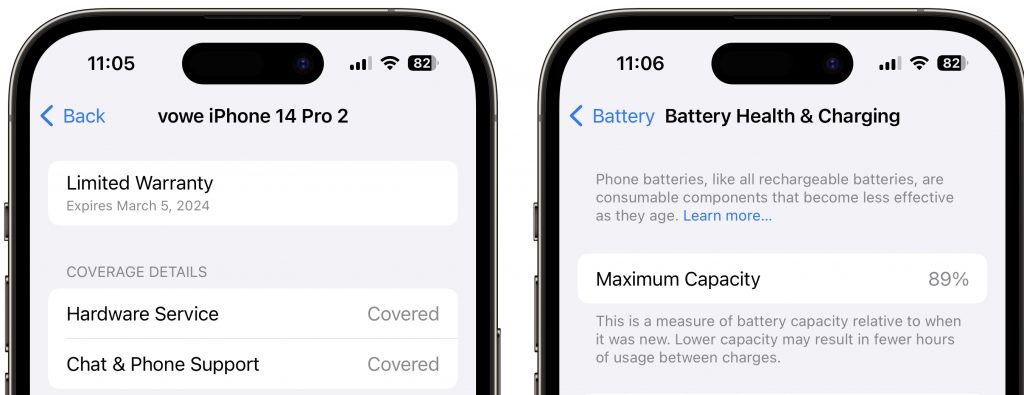
Heute ist mein iPhone exakt ein Jahr in Betrieb und der Akku zeigt eine Kapazität von 89% an. Wie sieht das bei Euch aus?

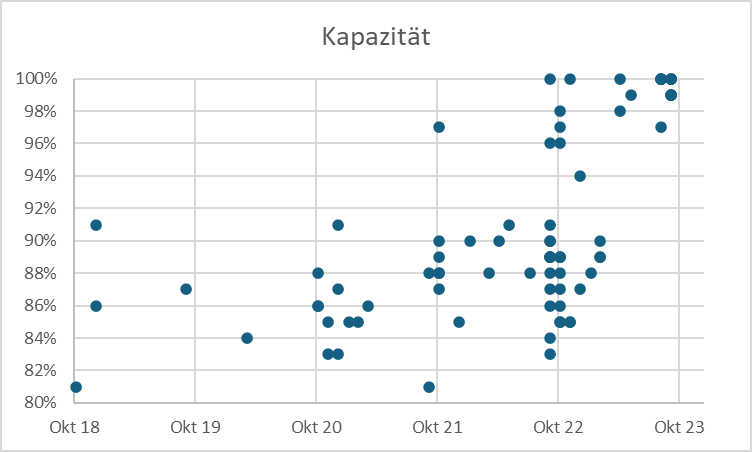
Update: Ich habe mal mehr als 80 Datenpunkte in eine Grafik gepackt und man sieht, dass die im Oktober 2022 in Betrieb genommenen iPhone 14 (Pro) sehr breit nach unten streuen. Meine Performance ist kein Ausreißer:

Was man eigentlich erwarten sollte, ist ein Bogen wie bei den höchsten Werten.

Neues bei iPhone und iPad

Apple hat das Betaprogramm 17.4 für iPhone und iPad gestartet. Die Software soll im März fertig sein. Daraus lässt sich einiges ablesen.

  1. In der Software finden sich Hinweise auf neue iPad Pros mit FaceID-Kamera an der langen Seite, wo das iPad Gen10 bereits die Front-Kamera hat. Beim Einrichten von FaceID muss das iPad im Querformat gehalten werden.
  2. iOS bekommt Anpassungen, um den DMA der EU (Digital Markets Act) zu erfüllen. Apple muss dazu den RFID-Reader auch für andere Zahlungssystem als Apple Pay freimachen und alternative App Stores und Browser-Engines zulassen.

Den Ankündigungen zu diesen Änderungen kann man entnehmen, dass sich Apple nur an den Buchstaben der Regelungen, aber nicht den gewollten Änderungen orientieren will. Dienst nach Vorschrift sozusagen. Alternative App Stores werden wirtschaftlich uninteressant gemacht und vor der Nutzung gewarnt. Die Stores gehen auch nur auf dem iPhone, nicht aber dem iPad.

Ich brauche weder neue App Stores noch andere Payment Apps, aber die Aggressivität, mit der Apple vorgeht, stößt mich ab.

Der Umzug der Front-Kamera auf die Längsseite ist längst überfällig und Apple wird einen neuen Platz für den Apple Pencil finden müssen, da Kamera und Induktiv-Lader kollidieren. Samsung und Lenovo haben das gelöst, indem sie den Lader auf die Rückseite des Tablets verschoben haben.

Bei den Apple Pens ist eine Neuordnung notwendig. Drei verschiedene Pens (Lightning, Induktion und USB-C) sind einfach zu kompliziert und umständlich. iPad-Anschaffungen würde ich um zwei Monate verschieben. Ich hoffe, das wird nach 2018 zum ersten Mal wieder ein großer Sprung für das iPad.

UAG Workflow Cases

Heute kam eine interessante Pressemitteilung:

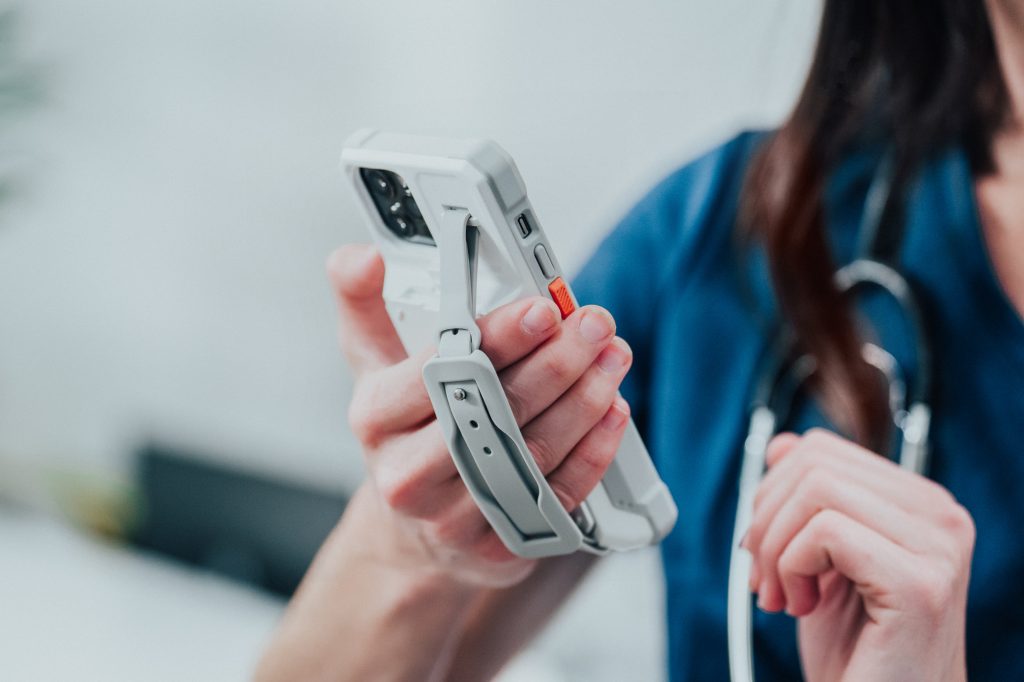
München, den 12.10.2023 – Urban Armor Gear (UAG), Hersteller von hochwertigen und hochsicheren Schutzhüllen und Zubehör für mobile Geräte, hat heute seine B2B-Produktserie „Workflow“ für den deutschsprachigen Markt vorgestellt. Neu im Sortiment sind iPhone-Hüllen für den Einsatz im medizinischen und operativen Umfeld, sowie dazu passende Wechsel Akkus und Ladestationen.

Die UAG Workflow-Lösungen wurden von Grund auf für den professionellen gewerblichen Einsatz entwickelt. Mit integriertem Wechsel Akku und Ladezubehör sorgen sie dafür, dass Arbeitsgeräte ohne Ausfallzeit rund um die Uhr einsatzbereit sind.

Das zentrale Element sind dabei die Workflow Battery Cases, die es in zwei Ausführungen gibt. Ganz in Weiß präsentieren sich die Healthcare Cases, die für den Einsatz in medizinischen Umgebungen entwickelt sind. Das robuste Material der Hüllen ist antimikrobiell und kann mit medizinischem Alkohol desinfiziert werden, um optimalen Schutz für Patienten und Personal zu gewährleisten. Für den Einsatz im operativen Bereich, wie zum Beispiel in Lagerhäusern, Logistikunternehmen oder im Transportwesen hat UAG die schwarzen Workflow rugged Battery Cases entwickelt, um maximalen Schutz der eingesetzten Geräte garantieren. 

Gemeinsam ist den Hüllen eine abnehmbare Handschlaufe, 12ft MIL-STD Fallschutz sowie ein austauschbarer 3.000 mAh-Akku, der die Geräte mit zusätzlicher Lebensenergie versorgt.

12ft sind 3,65m, das ist schon ein sehr deutlicher Fall. Ich habe die Produkte nicht selbst in der Hand gehabt, aber man erkennt auf Anhieb, dass es sehr klobige und dicke Cases sind. Interessant ist auch die Kombination mit Wechselakku. Das alles hat seinen Preis:

Workflow-Schutzhülle 160 Eur, Angebotspreis 145 Eur
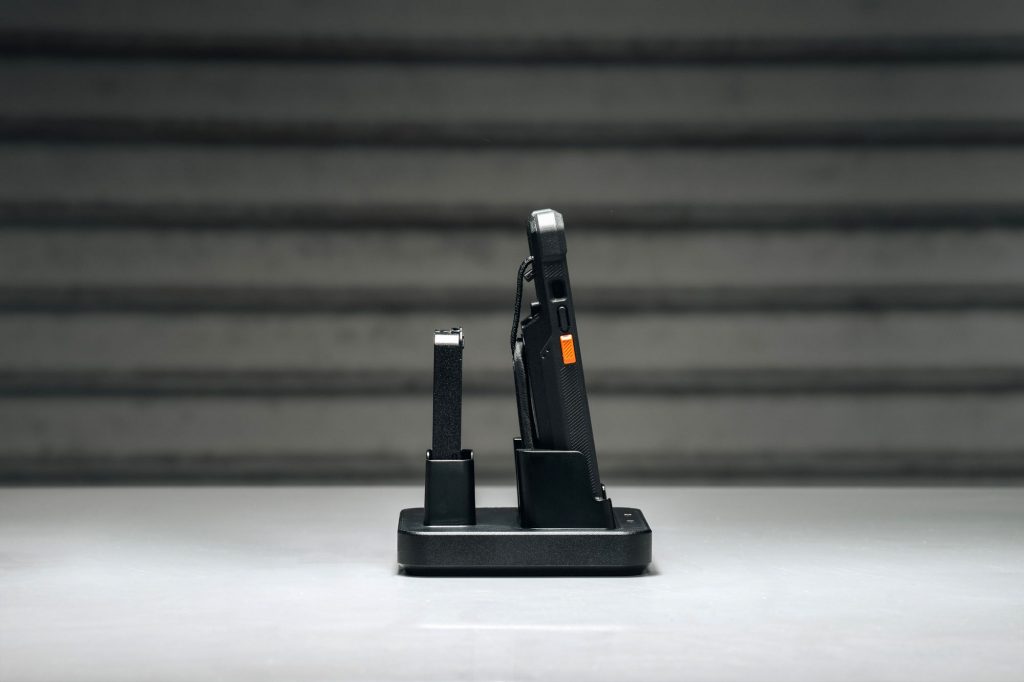
Worfklow Charge Cradle für ein Case und einen Wechselakku 80 Euro
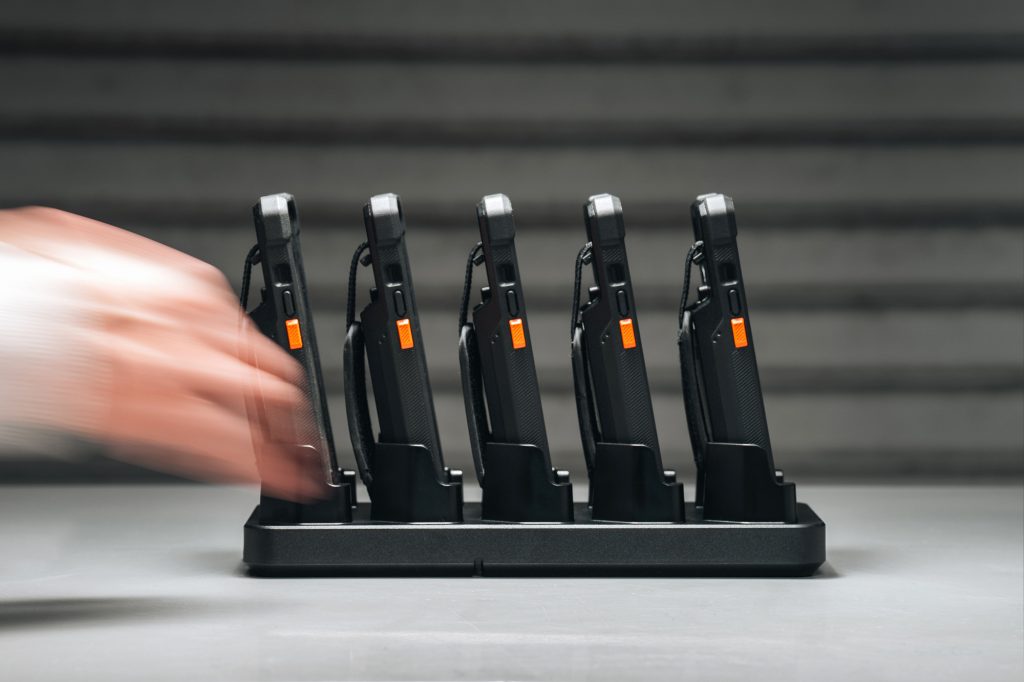
Workflow 5X Case Charge Station 170 Eur

iPhone 15 Pro vs 14 Pro

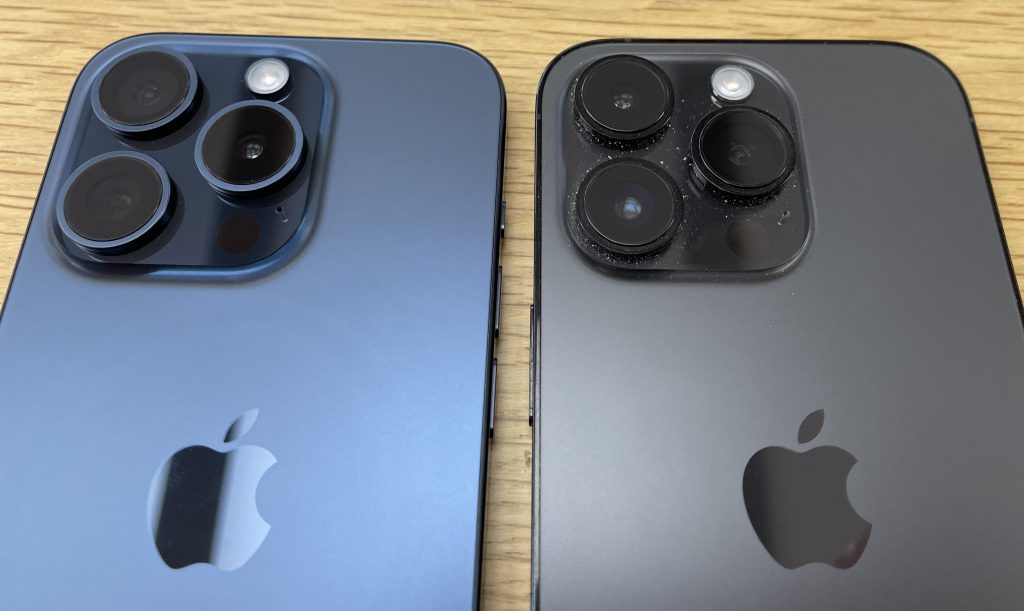
Ich war heute im Apple Store, um eine neue Watch SE für die Chefin zu kaufen. Dort habe ich mein iPhone 14 Pro neben das neue iPhone 15 Pro gelegt. Da ich keinen Pinsel dabei hatte, erkennt man meins am Staub. 🙂

Die beiden Gehäuse sind sehr ähnlich und ich vermute, dass man das neue in das Case des alten stecken könnte, wenn man es zwingt. Nicht dass man das tun sollte! Ich will nur die Größe kommentieren.

Der Rand der Kamerainsel geht nun mit einer Rundung in die Rückseite über, aber das große Wachstum von 12 über 13 zu 14 Pro ist erstmal gestoppt. Das oberste Glas der Objektive steht nicht mehr vor, dadurch wirkt jedes einzelne Objektiv dicker. Der Übergang von Glas der Rückseite zum Rahmen ist nun ebenfalls abgerundet aber das strenge Design der senkrechten Flanken ist immer noch da. Ich habe keine Präferenz und mag beide.

Jedes neue iPhone ist natürlich das Beste, das Apple je gebaut hat, aber das ist immer eine ganz behutsame Modellpflege. Solange die Software noch unterstützt wird und die Batterie noch gut ist, sollte man das iPhone einfach weiter nutzen. Das sind wirklich langlebige Geräte.

Apple Software Updates

Nächsten Montag, am 18.09.23 ab etwa 18:00 Uhr erscheinen (unter anderem) iOS 17 und watchOS 10. Ich habe aktuell schon die Release Candidates installiert. Und mir machen vor allem die kleinen Dinge gr0ße Freude, wie dieses Peanuts Watch Face. Das hier ist das Always-On Display, das beim Aufwachen der Uhr einen hellen Hintergrund bekommt, auf dem Snoopy und Woodstock immer wieder neue Kapriolen aufführen. Das macht gute Laune.

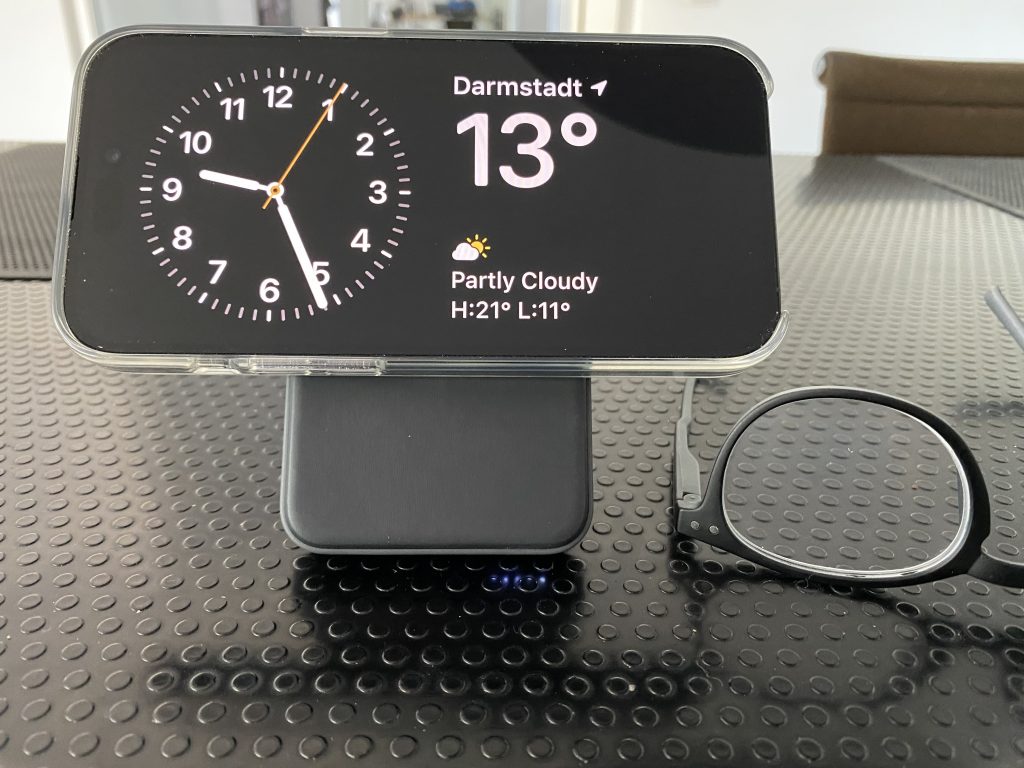
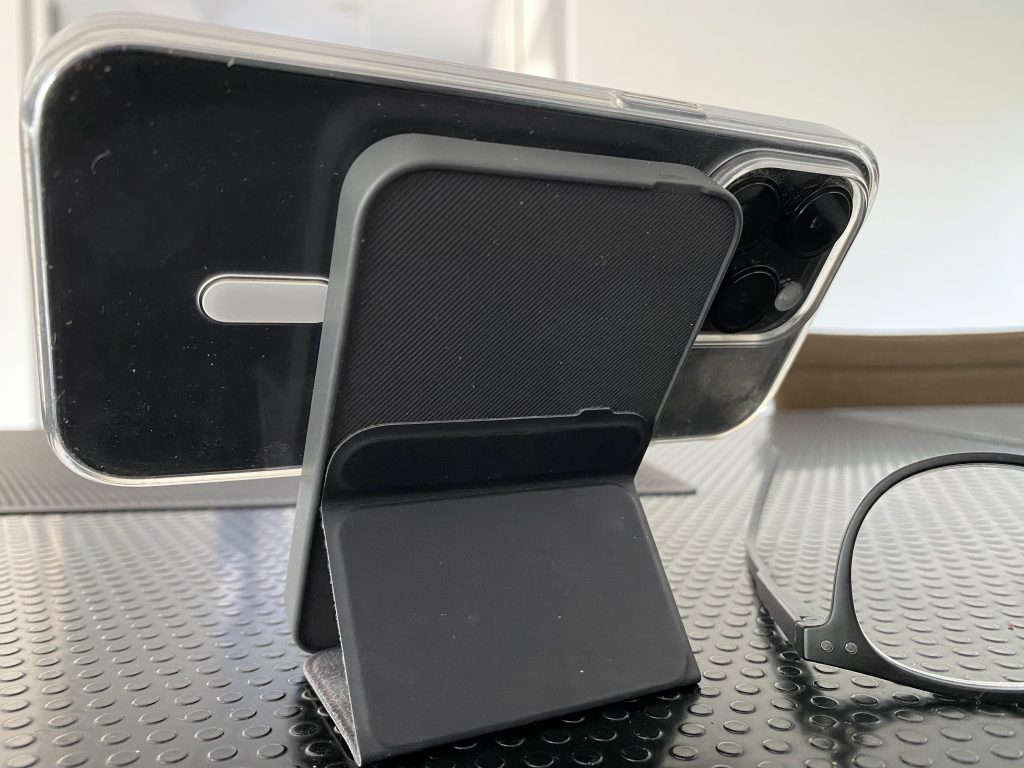
Der Standby-Modus in iOS 17 lässt sich durch Widgets konfigurieren und zeigt nachts ein stark abgedunkeltes Display mit roter Schrift auf schwarzem Hintergrund. Voraussetzung: Das iPhone wird geladen und ist im Querformat aufgestellt. Aktuell nutze ich dafür meine Anker 622 Powerbank. Ich bin gespannt, was ich da noch so alles brauche. Ganz heißer Kandidat ist der Anker 3-in-1 Cube, der allerdings auch ordentlich teuer ist.

Weil es gerade im Bild ist. Dieses Jahr habe ich das iPhone im Apple Clear Case gehabt. Das hat sich sehr bewährt. Rundum guter Schutz, auch für Display und Kamera, keine Verfärbungen.

A few thoughts on the Apple event

Predictions for the Apple iPhone event were on point this year. Apple did not suprise and they also did not disappoint. And predictions were wrong in one important respect. Apple did not raise prices.

My thoughts in no particular order:

  • iPhone 15 gets the Dynamic Island that was introduced last year on the 14 Pro. It also has the A16 Bionic processor found in the 14 Pro. The main camera gets upgraded to 48 MPixel, also found in … the 14 Pro. What it does not get is the variable refresh rate display, which Apple calls Promotion. Hence, not always-on.
  • iPhone 15 Pro and Pro Max get a new A17 Pro processor which once again blows past all other smartphones from any vendor. It also has a new internal architecture, much like the non-Pro 14 last year, that makes it more repairable. The frame drops the stainless steel which is replaced by Titanium, making the Pro model lighter than any before. Good change. Pro has a 3x telephoto lens and Pro Max goes to 5x.
  • The photo/video features are just blowing my mind. I need to wrap my head around all the details.
  • Apple drops Lightning and replaces it with USB-C. That is going to be popular with the Android crowd and tech nerds, but most regular iPhone users could not care less. Lightning is still superior in terms or durability and mechanical construction. Old accessories might no longer work. Apple will be happy to sell you new ones like the EarPods with USB-C connector. (EarPods are still the best casual microphone you can use, far superior to Bluetooth).
  • USB-C is a plug that can be used in many ways. On iPhone it supports USB 2, on iPhone Pro USB 3 with 10 Gbit/s. That is still not Thunderbolt like the iPad Pro uses. We will see what the charging cable will deliver. On iPad Pro it only support USB 2, so you need to buy a better (and thicker) cable.
  • Apple Watch Series 9 and Ultra 2 use a new chip based on the A15 making them faster. Peak display brightness goes up, but the design remains the same. A major design overhaul is expected for next year, when the Apple Watch turns 10.
  • Apple talks quite a bit about their progress towards their goal to become carbon-neutral by 2030. Apple Watch is the first product to get there. Apple is increasingly using recycled material and now is also dropping leather from all accessories. No more leather bands or leather cases. I like.
  • A neat party trick is the ability to double tap your index finger and thumb to execute the default option on Apple Watch, like dropping or answering a call, snoozing you alarm etc. This has been announced for the new watches only.

Did you see any suprises? What did you find interesting?

This is a camera

After crashing one iPhone I am now using Apple’s Clear Case

I find it quite amusing how Techtuber chat up the latest and greatest camera models. To folding revenues of camera manufacturers. Yes, it is not a coincidence that they all come out with their reviews at the same time.

Don’t fear missing out. Camera wars are over and the smartphone won. If you spend 400 Eur and up on a smartphone, you are good. There are measurebators who will tell you that this camera is better than that camera, but I am pretty sure that your quality as a photographer makes a bigger difference.

Don’t love cameras. Love photos.

Phone Link for iOS soon on Windows 11

Today, we are excited to announce that Microsoft Phone Link for iOS on Windows 11 is beginning to rollout to our global audience in 39 languages across 85 markets.  We recently announced that Windows 11 was expanding our Phone Link feature to enable the connection between a Windows 11 PC and an iOS mobile device with the goal of removing barriers between your phone and PC and making it easier to connect to the people you care about most.

The iOS app is already available, and Microsoft is collecting negative reviews in the App Store because the Windows app has not yet been updated. Currently it only support Android and I am using it with the vivo 90 Pro.

Over the next few weeks, you’ll begin to see this feature become available on your PC. 

More >