Requirements for Apple software updates

Most of my customers who are issuing smartphones and tablets to their employees, usually give their users iPhones and iPads. As I have outlined in my previous post, a big challenge is to keep these devices up to date. I often get asked which requirements need to be met for the OS software updates to be done automatically or manually by the user. Until recently, there was not much public information from Apple on this topic for iOS and iPadOS devices. This support article was recently updated by Apple and now includes helpful details on the criteria that need to be met for the iOS updates to work, e.g. network requirements and power requirements. For a user-initiated update, the device needs to have a battery percentage of at least 20%. Rapid Security Response updates can be installed while the battery percentage is at 5% and the device is connected to power. If you are managing iPhones and iPads, I recommend you to read the support article. Previously most of the information was only available on Apple’s AppleSeed portal and covered under NDA.

Enforce software updates for iOS devices

During last year’s WWDC Apple provided MDM vendors a new way to enforce software updates on iOS devices which are supervised. This is a big improvement over the previous options as users are no longer able to skip or circumvent these updates. The new feature allows administrators to set a deadline by which the update must be installed. The user always has the option to install the update prior to the date set through the MDM solution. This week’s release of iOS 17.6 gave me an opportunity to test this feature with our BlackBerry UEM. I was curious to see which notifications a user would get on their device as the WWDC23 video only shows the notifications for macOS. The first screen shows that the MDM has enforced an iOS update and by when the update will be installed. The second and third screen show the respective notifications 12 hours and one week before the update is due.

iPhone Orientation Lock automatisch schalten

Über das Control Center kann man einfach umschalten, ob sich der iPhone-Bildschirm drehen soll, wenn man das Gerät dreht. Meine Normaleinstellung ist “sperren”, sodass das Display stets im Hochformat ist. Aber bei zwei Apps ändere ich das dauernd: Photos und YouTube. Dort betrachte ich meistens im Querformat.

Den Weg ins Control Center kann man sich sparen. Man legt dazu eine neue Automation in Shortcuts an, wählt App und dort dann die beiden Apps Photos und YouTube, lässt die Automation sowohl beim Öffnen als auch beim Schließen laufen und wählt als einzige Aktion “Toggle Orientation Lock.”

Nun wird automatisch die Sperre beim Öffnen der beiden Apps freigegeben und beim Schließen wieder eingeschaltet. (Ja, mein iPhone läuft in englischer Sprache, damit ich mich nicht mit den kruden Übersetzungen rumschlagen muss.)

USB-Sticks ans iPhone und iPad anschließen

Die App „Dateien“ auf dem iPad und iPhone hat ein praktisches Feature, das gerne übersehen wird: Man kann USB-Sticks anschließen und auf die dort liegenden Dateien direkt zugreifen. Ganz praktisch ist das auf iPhones und iPads mit USB-C-Port. Dort benötigt man keine weiteren Adapter. Es reicht ein Stick mit USB C-Stecker. Bei Geräten mit Lightning-Port benötigt man Apples Lightning auf USB 3 Kamera-Adapter. Je nach USB-Stick muss man bei dem Kamera-Adapter ein Netzteil einstecken. Das iPhone bzw. iPhone weisen darauf hin, falls das notwendig ist. Laut Apple werden folgende Dateisysteme auf den USB-Sticks unterstützt: “APFS, APFS (verschlüsselt), macOS Extendet (HFS+) exFAT (FAT64) oder FAT”. So lassen sich einfach auch größere Dateien von und zum iPhone oder iPad übertragen. Dies funktioniert auch mit externen SSDs bzw. Festplatten und SD-Karten. Verfügbar ist diese Funktion für Geräte ab iOS 13 und iPadOS 13.

Apple indigo hat BSI-Zulassung erhalten

Im Oktober 2022 hat das Bundesamt für Sicherheit in der Informationstechnik (BSI) die Sicherheitseigenschaften von Apple iOS und iPadOS bestätigt. Die Zertifizierung läuft unter dem Namen indigo (iOS native devices in government operation). Apple indigo ermöglicht die sichere und native Nutzung von iPhones und iPads im behördlichen Umfeld und ist für die Nutzung bis hin zur Klassifizierungsstufe “Verschlusssache – nur für den dienstlichen Gebrauch” (VS-NfD) zugelassen. Knapp 20 Monate nach der Pressemeldung des BSI hat Apple indigo am 18. Juni 2024 eine Zulassung erhalten. Damit hat Apple einen wichtigen Meilenstein für den Einsatz von iPhones und iPads in deutschen Bundesbehörden erreicht. 

Neben den erlaubten iPhone- bzw. iPad-Modellen und einer der zugelassenen VPN-Lösungen benötigt man für Apple indigo ein passendes Mobile Device Management (MDM). Das MDM kann entweder im Brightsite- oder Darksite-Modus betrieben werden. Aktuell gibt es noch kein für den sogenannten Brightsite-Einsatz zertifiziertes MDM. Es befinden sich zwei Anbieter im Zertifizierungsprozess. Diese MDM-Lösungen können vor Abschluss des Zertifizierungsprozesses zur Verwaltung der Apple indigo Endgeräte verwendet werden. Für das Darksite-Setup, das für indigo eher selten zum Einsatz kommt, wird keine BSI-Zertifizierung benötigt. Für die Brightsite-MDMs wird die Zertifizierung benötigt. Mit meinem Arbeitgeber sind wir im BSI-Zertifizierungsprozess für unsere MDM-Lösung BlackBerry UEM. Das Apple indigo Ökosystem kann um zugelassene Apps erweitert werden. Die Apps sind dann notwendig, wenn man Nutzungsszenarien hat, die nicht von den zugelassenen Apple Apps Kalender, Kontakte & Mail abgedeckt sind. Im Kontext von Apple indigo darf z.B. Safari nicht auf dienstliche Ressourcen zugreifen. Das macht den Einsatz von Drittanbieter-Webbrowsern notwendig. Zurzeit gibt es zwei zugelassene Webbrowser. Einer dieser Browser ist SecuFox von Secusmart.

Wer sich zum Thema Apple indigo und kompatiblem MDM austauschen möchte, kann mich gerne kontaktieren. Im Kontext von Apple indigo habe ich schon einige Proof of Concepts mit unserer Lösung zur Verwaltung mobiler Endgeräte, BlackBerry UEM, umgesetzt.

Apple Business Manager: Disable Activation Lock

Organizations providing iPhones and iPads to employees can sometimes encounter a hurdle: returned devices with Activation Lock still enabled. This prevents assigning the device to a new user. Disabling Activation Lock can be inconvenient, especially if:

  • The device is locked with a personal Apple Account (not the company account).
  • The device wasn’t enrolled in a Mobile Device Management (MDM) solution.

Solutions based on MDM enrollment

  • Supervised MDM devices: If the device was enrolled in an MDM as a supervised device, your MDM solution likely offers a bypass code to remove Activation Lock.
  • Contacting Apple (limited success): You can also contact Apple, proving ownership and purchase of the device. However, this method isn’t foolproof.

Simplified removal with Apple Business Manager

Fortunately, Apple has streamlined Activation Lock removal for organizations using Apple Business Manager. Now, you can disable Activation Lock even on devices not enrolled in MDM, as long as they are registered with Apple Business Manager. In the Apple Business Manager device view you now have the option to select “Turn Off Activation Lock”. As far as I am aware, the feature was turned on today for my Apple Business Manager account. I know plenty of my customers who will be very happy about this feature. Turning off activation lock will work for all device types enrolled in Apple Business Manager, including Macs, iPod Touch devices and Apple Watch. All users in Apple Business Manager with a role that has Manage Device privileges can turn Activation Lock off.

Apple führt Tap to Pay auf dem iPhone in Deutschland ein

Geschäfte können jetzt reibungslos und sicher Zahlungen mit kontaktlosen Kredit- und Debitkarten, Apple Pay und anderen digitalen Geldbörsen akzeptieren — nur mit einem iPhone und einer vom Zahlungspartner unterstützten iOS App

Apple 25.6.2024

Sehr cool. Damit kann jedermann ohne zusätzliche Hardware Kartenzahlungen akzeptieren, auch ohne z.B. ein Terminal wie von SumUp zu erwerben.

Apple WWDC 2024

Ich habe die ganze Präsentation geschaut und fand sie sehr informativ. Ich brauche ein paar Tag, um sie ganz zu verarbeiten. Bis dahin empfehle ich die exzellente Zusammenfassung von Dr. Michael Spehr auf faz.net. Ich habe keine Ahnung wie er das so schnell verdichtet hat.

Bei mir blieben ein paar Eindrücke besonders hängen:

  • iPadOS 18 bleibt iPadOS treu und vermeidet, macOS Konkurrenz zu machen. So viele professionelle Features fehlen weiterhin. Es bleibt damit die Apple-Plattform, die man vielleicht am meisten nutzt und auf die man doch zuerst verzichten kann.
  • Apple hat nicht einmal AI gesagt. Es heißt Apple Intelligence, ganz als hätten sie es erfunden. Apple ist immer “on message” und da kommt dann ganz viel Apple Speak her: Super Retina XDR Plusquadrat.
  • Apple Intelligence läuft auf dem Gerät oder in Apples eigener Cloud, benötigt mindestens ein iPhone 15 Pro (!) oder ein iPad bzw Mac mit M1 und neuer. Sorry, iPhone 15 Nutzer. Außerdem gibt es das dieses Jahr zunächst nur in englischer Sprachkonfiguration als “beta”. Keine neue Erkenntnis: Was zur WWDC angekündigt wird erscheint irgendwann binnen der nächsten 12 Monate.
  • Die iPhone-Oberfläche hechelt weiter hinter Android her. So kann man nun Icons frei anordnen und einfärben. Vorteil: Dem Nutzer werden viele Geschmacksverirrungen anderer Plattformen erspart.
  • AirPods Pro bekommen “Voice Isolation”. Das haben meine schon?
  • Siri bleibt Siri, kriegt aber Unterstützung von Apple Intelligence. Randbedingung siehe oben.

Ungefähr so sieht übrigens mein iPhone aus. Nur eine Seite mit den wichtigsten Programmen. Der Rest in der Library, weniger als 100 Apps. Absolut perfekt.

Was ist bei Euch hängengeblieben?

The things iPad needs to be considered Pro

Jason Snell (Upgrade, Six Colors) and Federico Viticci (MacStories) love the iPad. In this segment from their review of the new iPad Pro in Upgrade Podcast 512, they break down exactly where iPadOS is holding the new hardware back.

This is the story that Federico wrote, and which reads like a complete backlog for iPadOS development. Of course, Federico wanted to write a review, but Apple could not spare a review unit for him.

Ein iPad ist ein iPad ist ein iPad

Solche Umfragen werden meistens ab etwa 50 Teilnehmern stabil. Hier bestätigt sich meine Annahme, dass nur wenige (Create Music, Create Video) mehr als einen “einfachen” iPad benötigen. Wir haben im März einen angeschafft und der hat sich allerbestens bewährt. Erfreulicherweise war er dank sattem Rabatt bereits günstiger als der von Apple gestern gesenkte Preis. Allerdings haben wir den frechen Aufpreis für den Speicherausbau von 64 auf 256 GB bezahlt. Und das auch nur, weil man später nicht nachrüsten kann.

Wie seht Ihr das? Muss es ein iPad Air oder iPad Pro sein?

Schlankheitskur beim iPad Pro

Ich kann mich noch sehr genau an das Gefühl erinnern, als ich mein erstes iPad Pro 12.9 mit aktuellem Design in der Hand hatte. Apple zählt das als 3rd gen. Es war einfach un-glaub-lich flach. 3rd gen (A12X) und 4th gen (A12Z) waren 5.9 mm dünn und wogen 633 bzw 643 g.

Mit dem 5th gen (M1) und 6th gen (M2) legten die Geräte einen halben Millimeter und 51 g zu. Und ja, das spürt man. Das heute neu vorgestellte Gerät 7th gen (M4) geht in die andere Richtung: 1,3 mm dünner und 103 g leichter.

Ich habe es nicht in der Hand gehabt, aber ich verstehe jeden, der deshalb aus dem Häuschen ist. Das ist deutlich spürbar.

Ich bin allerdings der Ansicht, dass die Hardware nichts zu wünschen übrigließ. Apple hat sogar die Weitwinkelkamera rausgenommen. Und das wird kaum jemand auffallen.

Was iPad braucht, ist bessere Software. Und die könnte nächsten Monat folgen.

No big surprises at Apple event

The Apple event went as predicted by leaks.

  • New iPad Pro M4 11″ and 13″ Ultra Retina XDR, a dual-layered OLED screen
  • New iPad Air M2 11″ and 13″ Liquid Retina display
  • New iPad Air and iPad Pro now have the camera at the long side, just like the iPad 10
  • New Pencil Pro (149 €) for iPad Air M2 and iPad Pro M4 with squeeze and rotation gestures and haptic feedback
  • iPad 10 gets a lower entry price. iPad 9 is gone.
  • iPad mini was just a nod at the end of the event without any news
  • New Magic Keyboards for iPad Pro M4 only

In software news Logic Pro and Final Cut Pro get upgraded with stunning new features. Final Cut Camera sherlocks RecNGo.

AirTags Galore

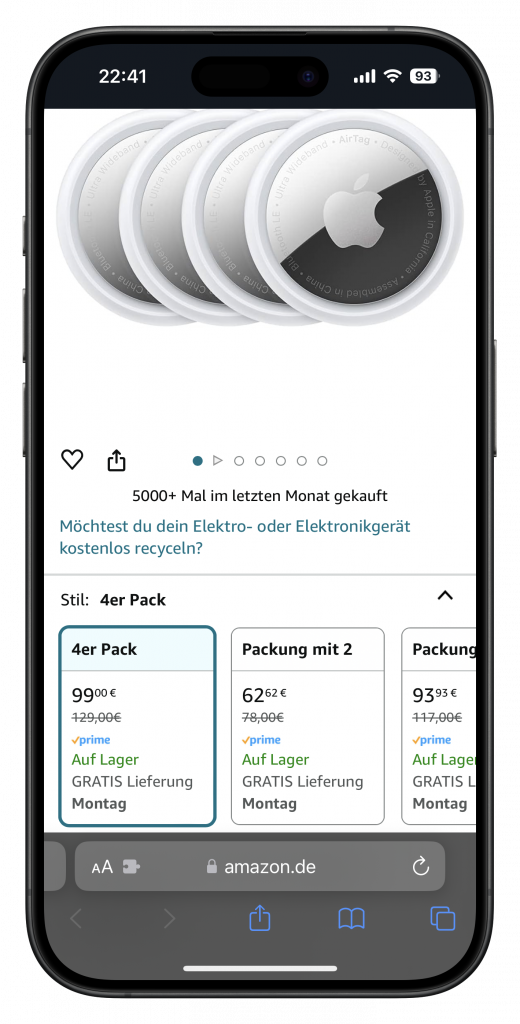
AirTags gibt es im Viererpack günstig und ich habe mittlerweile jede Menge, vor allem, da man sie auch in der Familie teilen kann. Das Limit wurde mittlerweile auf 32 erhöht. An jedem Schlüsselanhänger, am Halsband, in der Tasche, etc.

PowerTipp, wenn man wirklich mal ein kaputtes AirTag hat. Einfach am Fahrrad anbringen und dann ein zweites an einer Stelle, die man nicht so leicht findet, etwa im Motor-Gehäuse.

Allerdings hatte ich noch keinen kaputten und verloren habe ich auch noch keinen.

#reklame