Copilot in Word

Wenn man Word öffnet und ein neues Dokument startet, dann drängt sich Copilot auf. Das ist Clippy alias Karl Klammer in seiner dümmsten Form.

Ignoriert man dieses aufdringliche Verhalten und beginnt zu schreiben, dann erscheint links neben der aktuellen Zeile stets das Copilot-Icon.

Das ist eine Vereinfachung des schreiend bunten Copilot-Icons rechts oben im Banner.

Versucht man dieses Icon aus dem Banner zu löschen, dann erkennt man, dass diese Option ausgegraut ist. In den Word-Optionen kann man Copilot ausschalten.

Trotzdem entfernt Word dieses Icon nicht aus dem Banner und schiebt es sogar in ein kleiner werdendes Fenster immer wieder von rechts rein.

Wie verzweifelt kann man sein, Microsoft?

PS: Ich habe das noch mal in den anderen Apps kontrolliert. Auch in Excel und Powerpoint kann man Copilot in den Optionen deaktivieren.

More >

Copilot Datenschutz

Microsoft hat Copilot mittlerweile ein paar Einstellungen zum Datenschutz spendiert, die aber recht gut versteckt sind. Diese Optionen habe ich sukzessive alle ausgeschaltet. Wie aber kommt man da hin? Man klickt links unten auf das eigene Profil-Icon und dort dann auf die Einstellungen.

Wer diese neuen Einstellungen noch nicht hat, ist wahrscheinlich noch auf einer älteren Copilot-Version. Alte Conversations kann man mittlerweile auch löschen. Rechts-Click in der Sidebar öffnet ein Kontextmenü mit der Löschoption.

Wenn man das Copilot-Fenster schließt, läuft die App im Hintergrund weiter. Im Überlaufbereich der Taskbar kann man Copilot dann mit einem Rechts-Click endgültig schließen.

Ich verstehe das nicht mehr

Ich bin zahlender Microsoft-Kunde, aber ich verstehe das Unternehmen langsam nicht mehr. Es kommt mir so vor, als ob Microsoft an jeder Kreuzung falsch abbiegt.

  • Werbung in der Outlook-App, die ich schon rausgeschmissen habe, als ich mich nicht mehr mit meiner Mail-Adresse anmelden konnte.
  • Werbung an zig Stellen in Windows, sogar im Startmenü.
  • Dann macht Microsoft den Authenticator zum Passwortmanager, um diese Passwörter in Kürze wieder zu löschen.
  • Aggressive Platzierung von Copilot, überall.
  • Ohne Not macht Microsoft mit Windows 10 die Hälfte der PCs da draußen unsicher. Keine Sicherheitsupdates mehr.
  • Widgets voll mit Clickbait-Nachrichten.
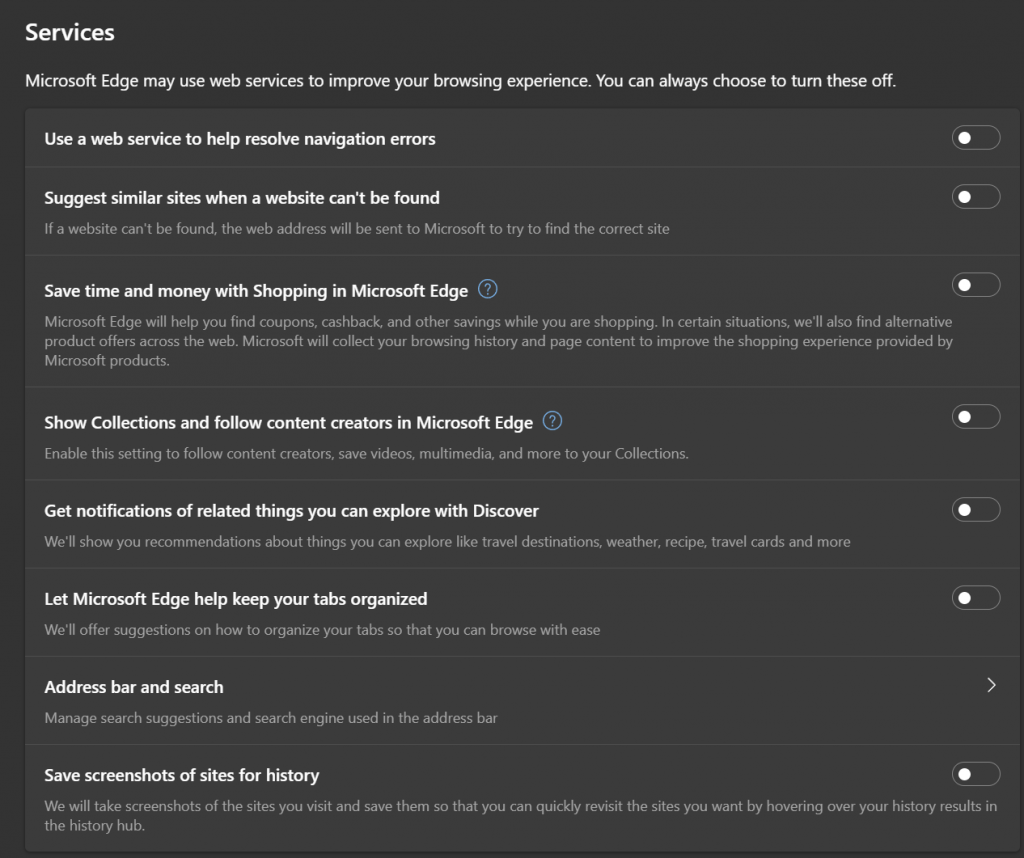
  • Dark Patterns in Edge, wo man immer wieder genervt wird, die Einstellungen auf Microsofts Wunsch umzustellen.
  • Haarstrübende Einstellungen in Edge, die ich monatlich kontrollieren muss, weil Microsoft sie immer wieder hinter meinem Rücken aktiviert.

So stellt sich Microsoft meine Startseite in Windows 11 Professional vor.

Microsoft finally gives up on Skype

Picture Microsoft

Skype was one of Microsoft’s weirdest acquisitions and the product is finally put to rest with a transition to Teams (free). The end for Skype was first rumored in XDA Developers and then reported all over the world. Microsoft reacted with a blog post, explaining the transition.

The Skype branding saga is not as bad as Google’s messaging history. It was the first really good internet voice application, the ability to call international 800 numbers very useful, but the rebranding of enterprise messaging as Skype for Business was just confusing.

Just three years ago, I rediscovered Skype for two use cases:

  1. It was the best ad hoc meeting service with skype.com/meetnow – no sign-up required but quite usable with a Microsoft ID.
  2. Chat with transparent translation. I was able to write messages in my own language and Skype would translate for my friends in Italy, Japan or Taiwan. My friends just had to declare their favorite language and that’s what they got from me. It wasn’t perfect but serviceable.

What happens next? Skype will migrate your contacts and chats into Teams. Skype was already running on a Teams infrastructure and I was only missing my Skype contacts.

Things will still be awkward between Teams with your company ID, and Teams with your private Microsoft ID. And I have a hunch that people want to leave their company tools behind when they switch from Innie to Outie.

More >

Copilot: Now you see it, now you don’t

On the top screen you see Windows Editor running on Windows 11 24H2 and a ThinkPad Z13. The bottom screen shows Windows Editor on Windows 11 24H2 and a Yoga Copilot+PC. Both are on Windows 11 Insider and Editor has the exact same version.

On ThinkPad Editor has a Copilot icon which offers some rewrite functions. It sends the text to the Microsoft Azure cloud for processing and deducts from the Copilot credits.

On Yoga Copilot+PC this icon is missing, and you cannot use these rewrite functions in the cloud nor locally, even though Copilot+PCs are advertised as being superior because they can run AI right on the machine.

I love this Yoga notebook with its superior performance and battery life, but Copilot+ it is not. This feels more like Copilot-.

This is simply a huge marketing SNAFU. Shower partners with money so that they build powerful Snapdragon-based PCs, then force a special Copilot-button on them and finally ask Enterprise IT admins to remap this button to launch the Microsoft 365 app.

PCs ohne Windows-Support

Das ist ein Microsoft Surface Pro von 2017, die Version zwischen Surface Pro 4 und Surface Pro 6, die aus unverständlichen Gründen nicht Surface Pro 5 hieß, sondern einfach nur Surface Pro. 16 GB 1866 Mhz LPDDR3 RAM und 512 GB Solid State Drive (SSD), Intel Iris Plus Graphics 640 und ein Intel Core i7-7660U. Dieser Rechner wird nicht von Windows 11 unterstützt. Er hat wirklich reichlich “Wupp”, aber Microsoft schließt die siebte Generation (und ältere) der Core i7 aus.

Man könnte den Rechner natürlich weiter mit Windows 10 betreiben, wenn Microsoft den Support für Windows 10 demnächst nicht ebenfalls einstellen würde. Was bleibt:

Es könnte so einfach sein:

PS: Apple-Kunden geht es auch nicht besser.

Zweite Welle für Microsoft Copilot 365

Gestern hat Microsoft eine “zweite Welle” für Copilot angekündigt, die innerhalb der nächsten zwei Monate heranrollen soll. O-Ton:

We’re launching the next wave of Microsoft 365 Copilot, bringing together web + work + Pages as a new design system for knowledge work.

First, we’re announcing Copilot Pages—a dynamic, persistent canvas designed for multiplayer AI collaboration. It’s the first new digital artifact for the AI age. 

Second, we’re rapidly improving Copilot in the Microsoft 365 apps. Our customers tell us Copilot in Microsoft Teams has changed meetings forever—in fact, it’s the number one place they’re seeing value. We’re excited to do the same thing for advanced data analysis in Microsoft Excel, dynamic storytelling in PowerPoint, managing your inbox in Outlook, and more. 

Third, we’re introducing Copilot agents, making it easier and faster than ever to automate and execute business processes on your behalf—enabling you to scale your team like never before.

Ich bin skeptisch, was Microsofts Chancen für Copilot angehen. Immerhin müssen sie Unternehmen davon überzeugen, für jeden Monat und Mitarbeiter noch einmal 28,10 € zusätzlich zur bereits bestehenden Microsoft 365 Lizenz zu bezahlen. Wenn ich mich umhöre, dann scheint die beliebteste Funktion zu sein, sich Meetings zusammenfassen zu lassen. Das ist hilfreich, wenn man sich die Ergebnisse dieser Umfrage ansieht.

Mit anderen Worten: Ich muss gar nicht hingehen und Copilot schreibt mir einen Aufsatz, was denn dort vorgetragen wurde. Das ist eine enorme Zeitersparnis und deutet bereits auf die eigentliche Lösung hin: Man ersetze Meetings durch kurze Aufsätze, die man in Ruhe lesen kann.

Ein anderes Copilot-Feature aber erzeugt mit wenigen Clicks umfangreiche Powerpoint-Präsentationen, die man sich dank Copilot aber auch nicht mehr ansehen muss. So spricht dann am Ende Copilot mit Copilot und der Feedback-Loop beginnt zu pfeifen. 😇

Da meine Microsoft 365 Lizenz gar nicht “eligible” für Copilot ist (und ich keine 28,10 € pro Monat zahlen würde), werde ich das alles nicht ausprobieren. Ich warte geduldig darauf, dass mein Copilot+ PC dann auch mal die lokal nutzbaren Copilot-Funktionen geliefert bekommt, die Microsoft vollmundig versprochen hat.