Ich war ja neulich sehr begeistert von RECnGO. Ein bisschen schwierig ist die Preisgestaltung: $20 für eine Woche oder $50 für einen Monat. Für professionelle Projekte passt das, aber nicht für den dauerhaften persönlichen Einsatz.
Die Möglichkeit, einen Lifetime Access für $69 zu erwerben, endete am 31. Oktober, aber Black Friday ist eine gute Gelegenheit, das Angebot noch mal aufleben zu lassen. Das gibt es nun bis zum Ende des 26.11.2023.
Schwalbach/Ts. – 22. November 2023 – Samsung verlängert die Herstellergarantie für alle neuen Galaxy-Modelle der Enterprise Edition von 24 auf 36 Monate. Das Angebot gilt für alle Galaxy-Smartphones und -Tablets der Enterprise Edition, die ab 2023 auf den Markt gekommen sind. Dazu gehören neben dem Galaxy S23 und S23 Ultra auch das Galaxy A34 und A54 sowie das Galaxy Tab S9 und Tab S9 FE. Geschäftskunden können zudem von Samsung Care+ for Business ADH profitieren: Der Geräteschutz unterstützt bei Unfallschäden und ist speziell für mobile Geräte im Unternehmen vorgesehen.
Pressemitteilung vom 22.11.2023
Solche Enterprise-Geräte findet man nicht in Mediamarkt & Co. Das ist eine eigene Vertriebsschiene. Wenn sie dann doch mal bei Amazon auftauchen, sind sie etwas teurer als die Consumer-Geräte.
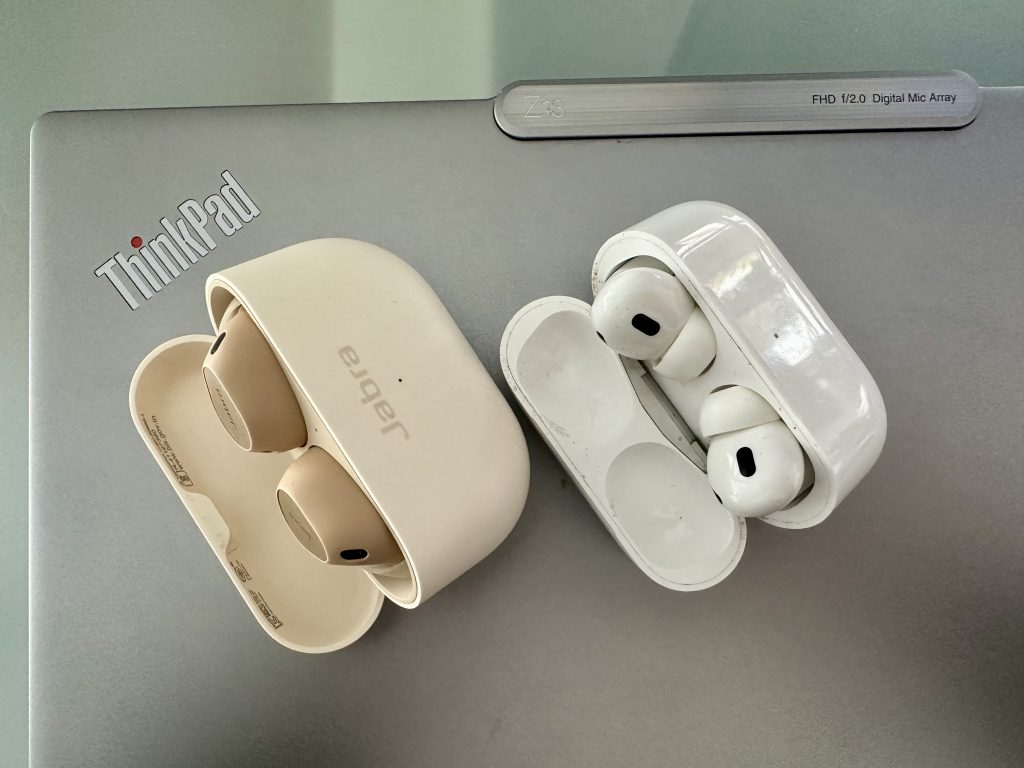
Wer PCs oder Android nutzt, braucht etwas anderes als AirPods Pro 2
Ich habe jede Menge Earbuds und Kopfhörer, die aus meinen Tests stammen. Die spannende Frage ist, welche ich davon dauernd nutzen. Das sind nicht notwendigerweise auch die, die ich zum Kauf empfehle. Es ist einfach eine Auswahl ohne Berücksichtigung des Preises.
AirPods Pro 2: Perfektion, mit einer kleinen Ausnahme. ANC und Transparenz sind einzigartig, die Integration in die Apple-Landschaft ebenfalls. Egal ob Apple TV, iPhone oder iPad, sie verbinden sich stets zuverlässig mit dem aktuell genutzten Gerät. Insbesondere bei der Transparenz-Funktion sind die AirPods Pro 2 unfassbar gut. Man hört alles, bei Bedarf sogar besser als ohne. Wenn dann aber dennoch ein lautes Geräusch auftaucht, etwa eine vorbeifahrender Bus, drehen sie die Lautstärke runter. Das funktioniert sogar bei einem zu lauten Konzert. Und die kleine Ausnahme, wo ich mir Verbesserung wünsche: Eine bessere Aufnahme meiner eigenen Stimme.
Jabra Elite 10: Das beste Pferd im Stall, sobald auch ein Android oder PC ins Spiel kommt. Da sich die Earbuds automatisch mit den beiden zuletzt genutzen Geräte verbinden (Bluetooth Multipoint), sind sie bei mir mit ThinkPad und PC gekoppelt. Der Wechsel ist unproblematisch und völlig transparent. Am Klang ist wie bei den AirPods nichts auszusetzen. Anfangs hatte ich ein paar Probleme mit dem Akkus eines der beiden Earbuds gehabt, die sich ohne Intervention verflüchtigt haben. Ein paar Mal vollständig leer gefahren und wieder aufgeladen und seit dem keine Auffälligkeiten mehr. Mit einer Ausnahme: Die Elite 10 laufen deutlich länger als spezifiziert. Ich komme locker auf 10 Stunden mit einer Ladung, mehr als jedes andere Modell. Die Earbuds sitzen weit außen im Ohr und sind damit saubequem. Größere Treiber sorgen trotzdem für den angemessenen Bassdruck. Die Bedienung über die beiden konfigurierbaren Schalter in den Earbuds sind übrigens vorbildlich. Langes drücken links leiser und rechts lauter. Einmal drücken links ist ANC/Transparenz, zweimal Siri. Rechts lange drücken ist lauter, einmal drücken Pause/Answer/mute und zweimal drücken nächster Track. Es geht noch mehr, aber mehr kann ich mir nicht merken.
Later next year, we will be adding support for RCS Universal Profile, the standard as currently published by the GSM Association. We believe the RCS Universal Profile will offer a better interoperability experience when compared to SMS or MMS. This will work alongside iMessage, which will continue to be the best and most secure messaging experience for Apple users.
It probably does not matter so much in WhatsApp land, but supporting RCS and not only SMS in iMessage is a welcome change. “Later next year” sounds like “after iOS 18 ships” but maybe Apple can make this happen earlier.
Operating on standards is preferable to providing Apple software on other platforms (“iMessage for Android”). You only have to look at the sorry state of Apple Music on Windows to see how hard Apple can fail. You can no longer access it on iTunes, and the only other options are previews of a website and an application they can’t seem to get to release status.
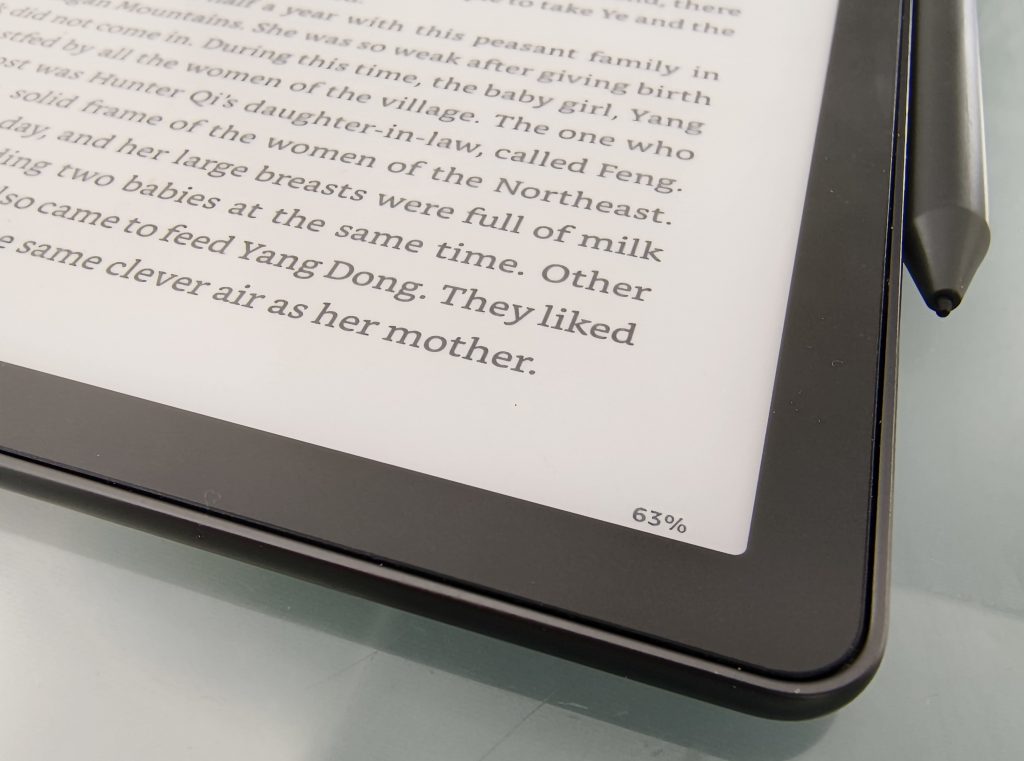
Netflix is preparing the release of a new series for March 2024. I can’t wait this long, and I also don’t enjoy TV series as much as a movie. Or reading a book for that matter. I started the book on my Kindle Scribe just yesterday and I could not put it away until I fell asleep.
The Three-Body Problem is the first chance for English-speaking readers to experience this multiple award winning phenomenon from China’s most beloved science fiction author, Liu Cixin.
Set against the backdrop of China’s Cultural Revolution, a secret military project sends signals into space to establish contact with aliens. An alien civilization on the brink of destruction captures the signal and plans to invade Earth. Meanwhile, on Earth, different camps start forming, planning to either welcome the superior beings and help them take over a world seen as corrupt, or to fight against the invasion. The result is a science fiction masterpiece of enormous scope and vision.
Apple hat heute bekannt gegeben, dass der kostenlose Zugang zu Notruf SOS über Satellit für bestehende iPhone 14-Nutzer:innen um ein weiteres Jahr verlängert wird.
Die kostenlose Testphase wird für iPhone 14-Nutzer:innen verlängert, die ihr Gerät in einem Land aktiviert haben, das Notruf SOS über Satellit vor dem 15. November 2023, 12 Uhr mittags unterstützt. Weitere Informationen, unter anderem zur Verfügbarkeit von Notruf SOS über Satellit unter support.apple.com/de-de/HT213426.
Mich würde interessieren, wie oft das tatsächlich genutzt wird.
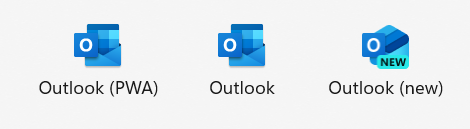
Dreimal Outlook. Which is which? Outlook (PWA) ist eine Browser-App, hier von Brave Browser. Outlook ist ein Windows Binary aus Microsoft 365. Outlook (new) ist die Ablösung von Mail & Calendar aus Windows 11. Diese App ist der designierte Nachfolger für das alte Windows Binary (und das für Mac).
Outlook (neu) ist eine PWA. Die braucht eine Server-Komponente und sei es nur als Cache. Wenn du einen fremden Account, der nicht bei Microsoft gehostet ist, darin anzeigen willst, muss Microsoft erst mal die Mail aus deinem Postfach abrufen.
Bei mir liegt das Postfach auf outlook.com und ist für Outlook (neu) sofort verarbeitbar. Das gilt genauso für alle Postfächer in Microsoft 365 (Exchange Online).
Wenn man ein GMail-Postfach hinzufügen will, dann sagt Microsoft deutlich an, dass sie dort die Mail holen werden. Wer das nicht will, sollte Outlook (neu) nicht einsetzen. Dann wird es einfacher sein, das GMail-Interface als PWA zu speichern.
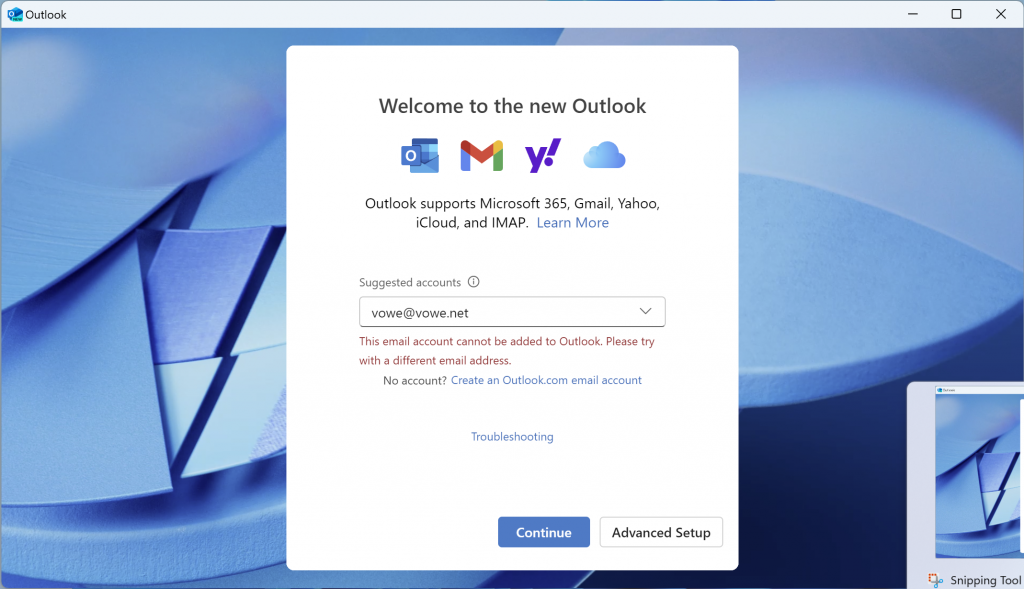
Microsoft is pushing the New Outlook app to Windows 11. It is replacing the old Mail & Calendar apps. However, I am unable to use this app with my Outlook.com account. And so do many others.
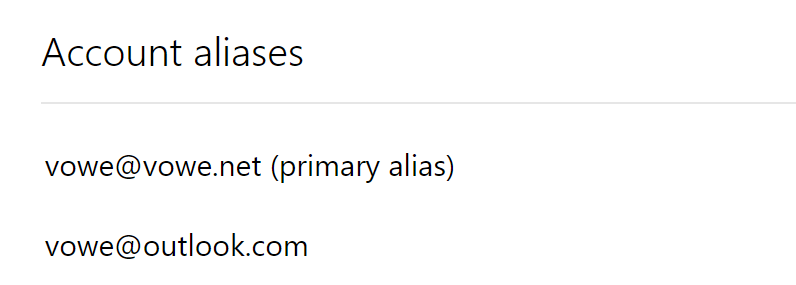
I have narrowed down the problem to a simple root cause: if you have set your personal mail address as your primary alias, you cannot add your Outlook.com account to New Outlook. If fails with both your personal email address and your Outlook.com address.
Only if you set your Outlook.com address as your primary alias, you will be able to add the account, but after that you cannot send mail from your personal email alias. Catch 22. Be extra careful when you do change your primany alias. You can only do that twice a week.
This bug is only in New Outlook and it only affects Outlook.com accounts. You can use Gmail accounts just fine. And you can use your personal email as primary alias in all other Microsoft apps, including Outlook on iOS and Outlook on Android, and the Outlook.com PWA.
I think it is quite hilarious that Microsoft only fails with the combination Windows + Outlook + Outlook.com. Let’s have a good laugh and then fix it.
New M3 chipsets in three sizes: M3, M3 Pro, M3 Max
Built with the same 3-nanometer process as iPhone 15
Industry-leading performance per Watt
Same 14″ and 16″ MacBook Pros and 24″ iMacs
13″ MacBook Pro is finally gone
New color option: “Space Black”
Apple is addressing customers who are not buying M1/M2 Macs because their GPU performance was too low. and those still on Intel Macs.
Apple is the only company which has bought up all 3-nanometer capacity and they want to run “scary fast”. M3 and M3 Pro ship now, M3 Max later in November. M3 Ultra (two M3 Max combined) is not announced. Apple will be squeezing out as many machines as they can and can shift iPhone capacity there.
This MacBook Pro is for people who “need” the latest and greatest. Space Black is for that crowd.
M3 raises the performance for graphics-intense workloads. And its hardware-supported codecs for video playback lead to even greater battery performance. If you can spare this much money for watching Netflix.
If you are in the market for Mac Pro or Mac Studio, hold your horses until next year.
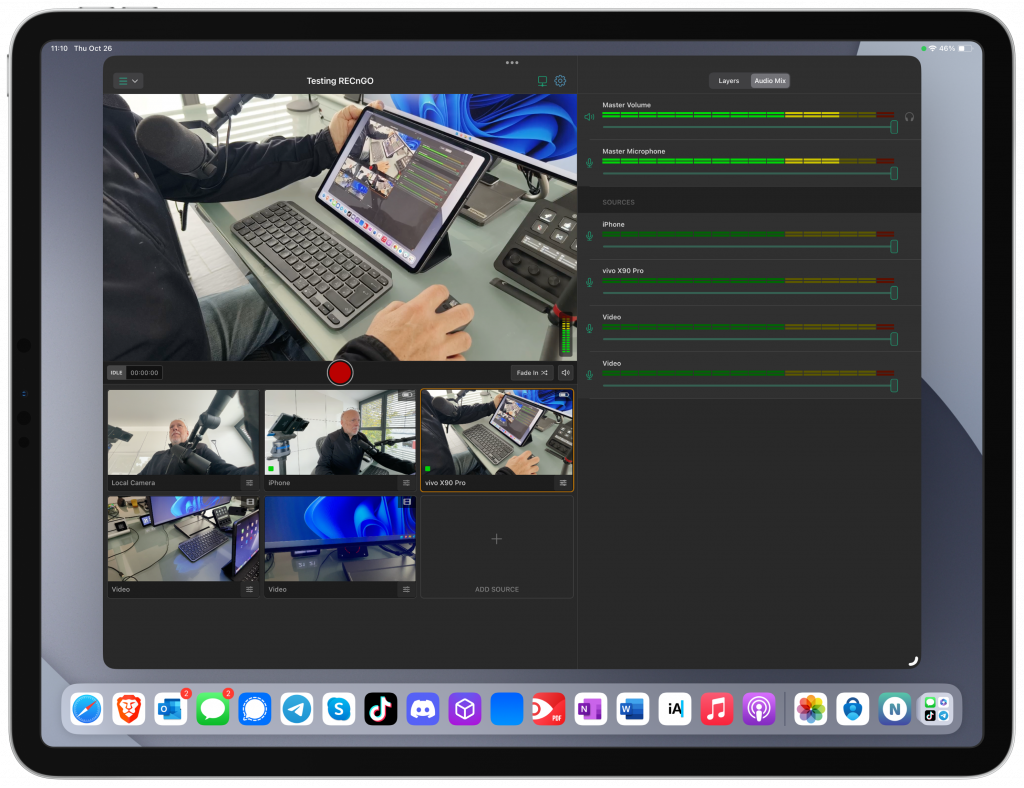
Streams mit nur einer Kamera-Perspektive sind langweilig. RECnGO verknüpft bis zu 12 iPhones und Androids in einem Stream. Ein Mac verbindet auch HDMI-Kameras.
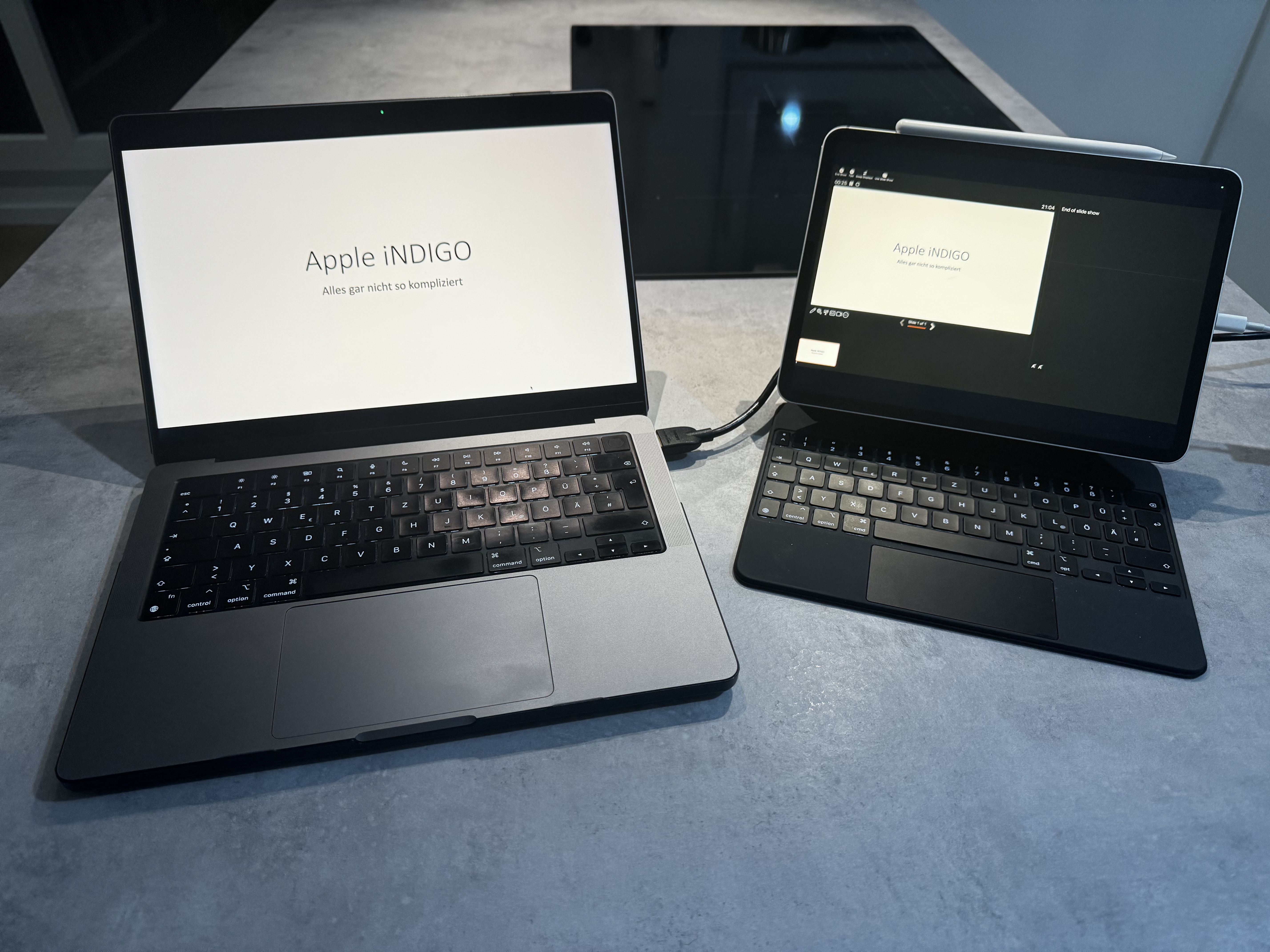
When I travel, I frequently have the need for a second monitor. My work laptop (not pictured) is running on Windows 11. Therefore I cannot make use of Apple’s Sidecar feature.
I used to have an external monitor that connects via USB C & HDMI to my laptop similar to this one. Unfortunately, I cracked the screen. I was about to order a replacement, when I came across an application called Capture Pro which was rebranded to Genki Studio recently. Genki Studio can display USB Video Device Class (UVC) input on your iPad and labels itself as a “UVC Viewer” in the App Store.
This is not the first post by Abdelkader Boui. He works as Principal Sales Engineer at BlackBerry. This job title does not do the breadth and width of his knowledge any justice. Messaging, mobile device management, policies, zero trust, he knows it all.
If I break things and can’t put them back together I ask Abdelkader.
Volker Weber
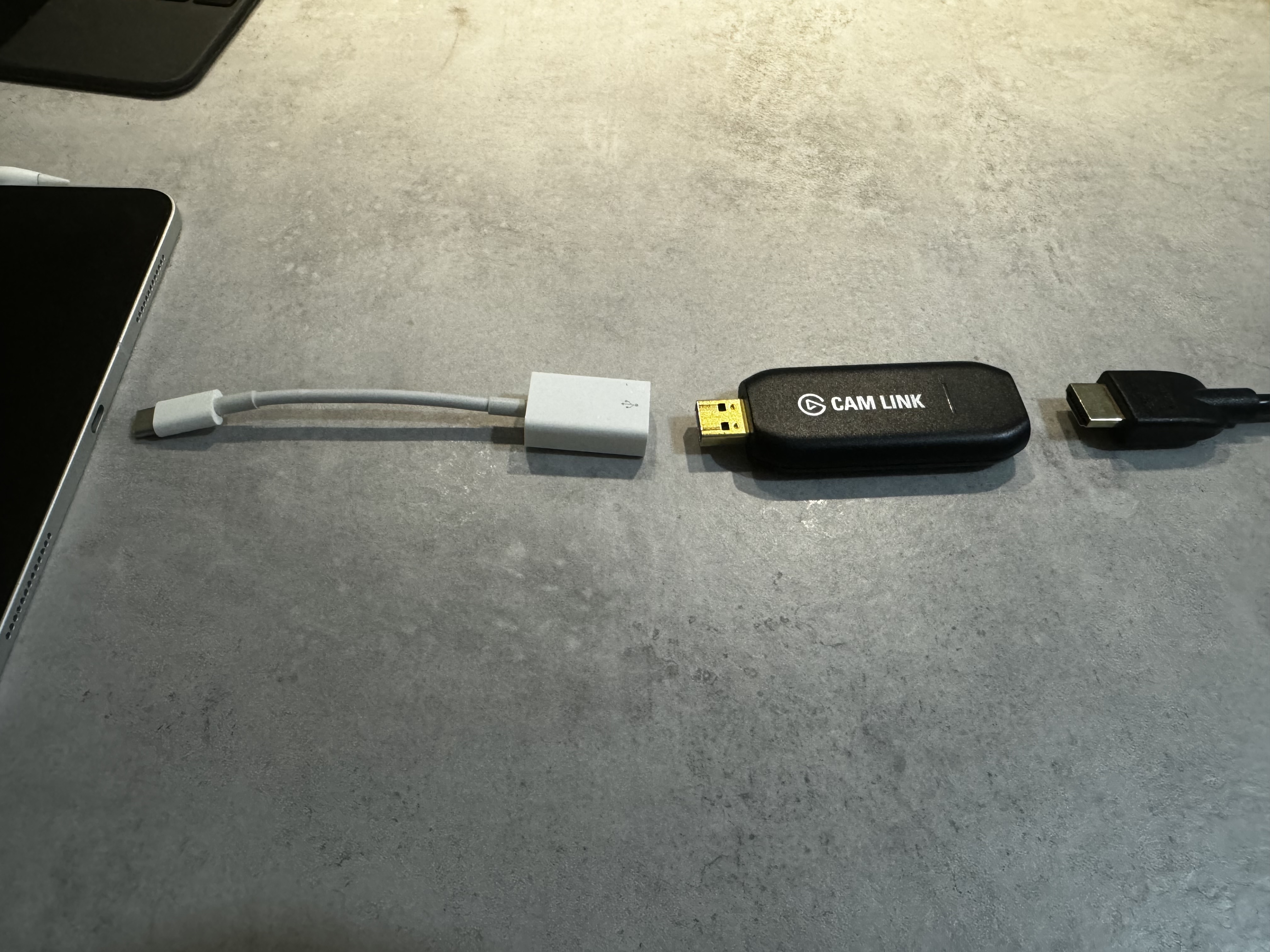
With iPadOS 17.x Apple introduced the support for USB Video Device Class. Support for UVC allows you to connect external USB video devices, e.g. webcams and USB capture cards, to your iPad and iPhone. This allows you to make use of external webcams and use them in apps like FaceTime. Another use case is to turn your iPad into an HDMI monitor. There are USB dongles like the Elgato Cam Link 4K that can turn “HDMI input” into “USB output” – in our case UVC. Which in turn can then be displayed in the Genki Studio app. Using the Genki Studio app and the Elgato Cam Link 4K I can now turn my iPad Pro 11″ into an external HDMI monitor.
I have used this setup with both Windows and macOS. It also works with other devices that have an HDMI output. I have been using this setup for the past few weeks with no issues.
Connect the Elgato Cam Link 4K to your iPad using USB C
All you need to connect the laptop to the Elgato Cam Link 4K is an HDMI cable. As the Cam Link is an USB A device, you will need an USB A to C adapter to connect it to the iPad. I usually use this USB A to C adapter from Apple. To keep the iPad powered, I am using the USB C port on the left side of the Apple Magic Keyboard. If you don’t have the Magic Keyboard, you could use any USB C port replicator with at least one USB A port and one USB C port for power in, e.g. Apple’s USB C multiport adapter, to keep the Elgato dongle connected and the iPad powered. With 109,- Euro the Elgato Cam Link 4K is rather expensive. If you want to go the cheap route, you can get cheap clones for 6 Euro from Amazon. For this use case they work the same as the Elgato Cam Link 4K.
There is also another app in Apple’s App Store that can turn your iPad into an external HDMI screen: HDMI Monitor – Orion. I have briefly tested that app and the basic features seem to be almost identical to the ones from Genki Studio.